Best AI Photo Editing Apps 2026 (and Which Change Your Face)
Typed fixes in an AI photo editor can change faces; a brush changes only the spot you mark. BestPhoto for one-tap fixes, Gemini for free, Photoshop for prints.
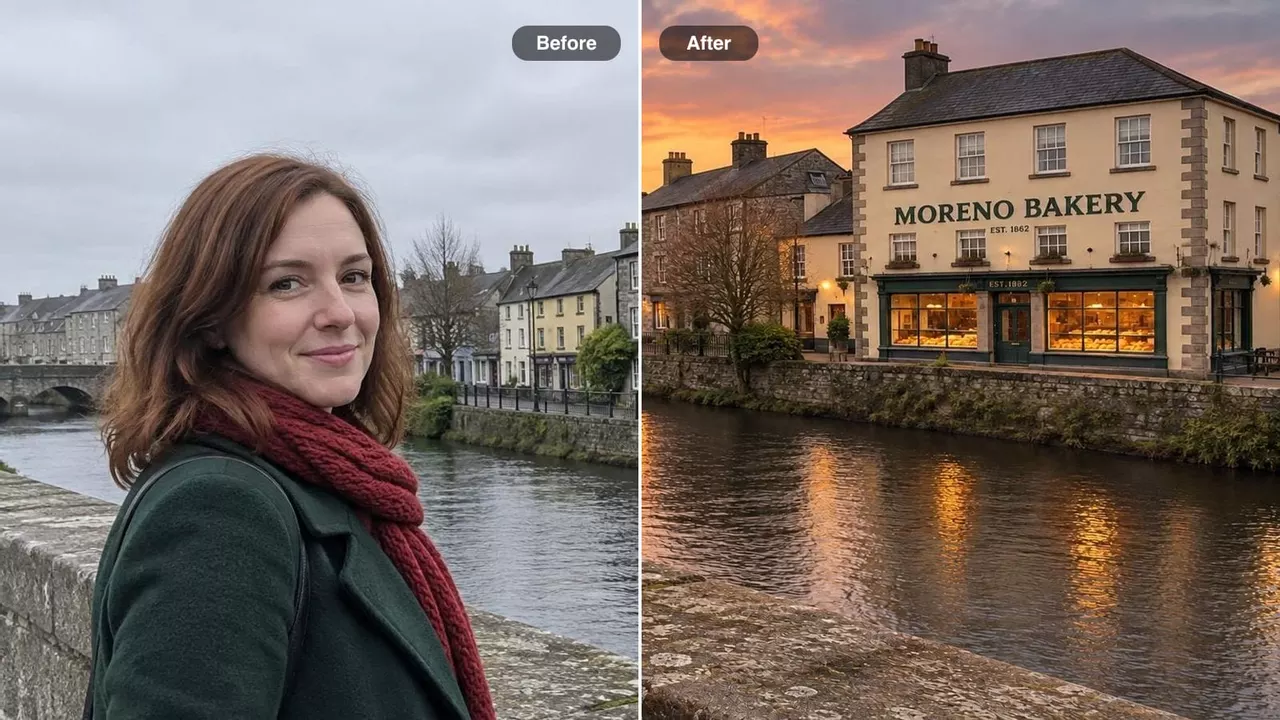
In 2026, the best AI photo editing apps are BestPhoto, Gemini and ChatGPT when you'd rather type the fix, and Photoshop or your phone's built-in eraser when only one spot should change. Typing is quicker and often free, but the app redraws your whole photo to do it, so faces can come back subtly different; a brush changes only the spot you mark.
BestPhoto is our own app, so it goes first. Here's who each editor is for:
- 1
BestPhoto, for one-tap fixes in any browser, with two free tries and no account.
- 2
Gemini, if it has to be free, on the web or your phone.
- 3
Your phone's own editor, for a quick free erase.
- 4
Photoshop and Lightroom, when the photo matters and must stay full size.
- 5
ChatGPT, for photos of people: it changed faces the least in our examples.
- 6
Canva, when the photo is going into a post.
- 7
Luminar, if you'd rather pay once.
Point or ask: the two kinds of AI photo editor
Every AI photo editor takes your change one of two ways. You point, by brushing over the stranger yourself, or you ask, by typing what you want and letting the AI work out the rest.
On the edited photo alone, you'd never notice the faces changed. You only see it next to the original, so compare the two before you print or post.
Asking usually shrinks the photo, too. A phone photo is 4,000 pixels wide or more; Gemini's free downloads are 1K, and our editor sent one back about 1,000 pixels wide. That's fine on a phone and too small for a big print. A brush editor like Photoshop keeps the full size.
And an ask editor can change things you never mentioned. Ask for a sunset, and it may decide the bakery across the river needs window boxes.

Original: Bare windows, a plain sign, a dark river.

BestPhoto: New window boxes.

Gemini's model: Wall lamps, a garbled sign, the shop mirrored in the river.
Pointing has the opposite weakness: it changes only what you mark, so a new sky doesn't warm the face in front of it.
So ask for quick fixes you'll share from your phone, and point when the photo is a print or a portrait you can't retake. When you ask, start from the original rather than an earlier edit, and say what must stay the same, as in our guide to restoring photos with ChatGPT.
Same photo, same request
Three everyday snapshots, one plain request each. Drag to compare, then switch on Show what changed.
The request: “Brighten my face, it's too dark.”

 OriginalBestPhoto



He's bright now, and so is the whole café. His eyes and glasses changed shape a little.
The dark face shows the difference most clearly. All three ask editors lit up the whole café, sweater and coffee cup included. The brush lifted only his face, and he's still exactly himself.
The sunset is where asking won. The ask editors warmed her face to match the new sky, though each slipped in something nobody asked for. The brush left her in gray daylight with a pale halo around her hair.
The stranger was the easy job. All four removed him cleanly, and Gemini's and ChatGPT's models did it without changing the couple's faces. The redrawn faces in the video above came from our editor.
1. BestPhoto: best for one-tap fixes in any browser
BestPhoto's AI editor runs in the browser on your phone or computer. Upload a photo, then pick a ready-made change like Remove Person or Replace Background, or describe your own.
The free Remove Person and Replace Background pages need no account and give two watermarked tries in all, shared with our other photo tools. The editor needs a free account, which gets 20 credits at our basic quality. The results above used its High setting, which comes with a plan: $14 a month covers about 100 High edits, and downloads without our watermark need an active plan.
Where it falls short: there's no brush or layers, results come back smaller than a phone original, and on High it changed faces more than Gemini's and ChatGPT's models did. Better than us if you're printing big (Photoshop), want free (Gemini), or the photo is mostly about faces (ChatGPT).
2. Gemini: best free ask editor
Google's Gemini app edits photos free with a Google account, on the web, Android and iPhone. Free downloads are 1K; a Google AI plan gets 2K, and AI Plus is $4.99 a month. In most countries you can switch off the visible sparkle in Settings, but an invisible SynthID tag always stays. Google doesn't publish the free daily limit.
Better than us if you want free and a 1K file is enough.
3. Your phone: best for a quick free erase
Before you download anything, check the photo app you already have. Google Photos' Magic Eraser and Apple's Clean Up are free point editors: mark the stranger and he's gone.
Clean Up needs an iPhone 15 Pro or newer, and Samsung's Galaxy AI edits are free on the S24 and newer. Google Photos also takes typed requests in Help me edit, in the US and a few other countries.
Better than us if one stranger needs to go and your phone can do it.
4. Photoshop and Lightroom: best when the photo matters
Photoshop is the classic point editor. Brush over what should go with the Remove tool, or select an area and use Generative Fill. Only that area changes, on its own layer over your full-size original.
Lightroom, its sibling, fixes a whole trip's photos at once. The Photography plan includes both for $19.99 a month on an annual plan, less than Photoshop alone at $22.99. Photoshop has a 7-day free trial.
Better than us if the photo is going on a wall, or you want a say over every pixel.
5. ChatGPT: best for photos of people
Upload a photo to ChatGPT and say what to change. Of the three ask editors above, its model kept faces closest to the original in all three photos, and results carry no visible watermark. The free plan's image allowance is limited, and OpenAI doesn't publish it. Go is $8 a month and Plus is $20.
Better than us if the photo is mostly about faces.
6. Canva: best when the photo is going into a post
Canva puts AI fixes next to your design. Magic Eraser brushes things out, and Magic Edit takes a typed request; Canva says it runs on Google's Nano Banana model, the one behind Gemini's editing. Magic Eraser is part of Canva Pro.
Better than us if the photo is headed into a post, a flyer or a slide.
7. Luminar: best if you'd rather pay once
Luminar, formerly Luminar Neo, is a computer editor with one-click sky swaps and lighting fixes, sold for a one-time price. Its generative tools, like GenErase, are included “for a period of 1 year from purchase,” then need a Luminar Prime subscription. There's a 7-day free trial.
Better than us if you edit on a computer and hate monthly bills.
Quick matchups
Firefly, Luminar, Midjourney, Canva or Photoshop for a photo?
Photoshop, for fixing your own photo. Firefly is Adobe's app for making new images with many AI models, Google's and OpenAI's included. Luminar is for paying once and Canva for a design. Midjourney restyles a picture rather than repairing it, and its website has no free trial.
Gemini or ChatGPT for editing a photo?
ChatGPT if faces matter, Gemini if it has to be free. Gemini garbled a small sign in our sunset photo, so zoom in on any text before you share.
Is there a free AI photo editor without a watermark?
Yes: your phone's eraser (Samsung's AI edits aside), ChatGPT's free plan, or Gemini with the visible mark switched off. BestPhoto's free results are watermarked.
All seven side by side
| Editor | Point or ask | How you pay | Free gets you | Runs on | Keeps full size |
|---|---|---|---|---|---|
| BestPhoto | Ask, plus ready-made fixes | Plans from $14 a month | 2 watermarked tries with no account; a free account gets 20 credits at basic quality | Any browser | No: about 1,000 px wide from a 12 MP phone photo |
| Gemini | Ask | Free; Google AI Plus $4.99 a month | Edits with a Google account, 1K downloads | Web, Android, iPhone | No: 1K free, 2K on a plan |
| Your phone | Point (Google Photos can also ask) | Comes with the phone | Built-in erasing; Samsung marks its AI edits | iPhone 15 Pro and newer, Google Photos, Galaxy S24 and newer | Samsung says its AI edits may be resized |
| Photoshop and Lightroom | Point | $19.99 a month for both, $22.99 for Photoshop alone (annual plans) | A 7-day Photoshop trial; a free phone app with basic tools | Windows, Mac, web, phones | Yes |
| ChatGPT | Ask | Go $8 or Plus $20 a month | Limited edits; OpenAI doesn't publish the limit | Web, phones, computers | No: a new picture |
| Canva | Both, inside a design | Canva Pro | The design tools; Magic Eraser is Pro | Web, phones, computers | Not stated |
| Luminar | Point, one click | One-time price; AI tools need Luminar Prime after a year | A 7-day trial | Windows, Mac; more on the All Platforms plan | Yes |
So which editor should you use?
For a stranger in a vacation photo, try your phone's eraser first. If it smudges, use BestPhoto's Remove Person or Gemini, then compare the faces with the original.
For a gray sky, ask ChatGPT, Gemini or us, then check signs and faces. For a dark face, brush it brighter in Lightroom or Photoshop, or ask ChatGPT if a brighter room is fine too.
For a post, use Canva. For a print on the wall, use Photoshop and keep the full-size file. For a whole trip, use Lightroom.
If a logo is the problem, see how to remove a watermark from a photo. To add someone who missed the picture, see adding a person to a photo, and for old family prints, the best AI photo restoration tools.
Other questions people ask
Can I edit a photo with AI without changing my face?
Yes. Use a point editor and keep the brush off your face, so it stays the original pixels. With an ask editor, say what must stay ("keep both faces exactly as they are"), edit the original rather than an earlier edit, and compare faces side by side before you share.
What's the best AI photo editor on iPhone or Android?
Start with the one built in: Clean Up on an iPhone 15 Pro or newer, Magic Eraser in Google Photos, or Galaxy AI on a Samsung S24 or newer. For bigger changes, the Gemini and ChatGPT apps work on both.
Do I still need Photoshop?
Not for quick fixes you'll share from your phone. You do if you print large, need layers, or want every pixel you didn't touch to stay yours. The Photography plan, which adds Lightroom, costs less than Photoshop alone.
The people and places in this post's photos are AI-generated.
Try it on one of your own photos
Upload a picture and see the result free, with no card. Pay only when you want more.