Why Old Photos Turn Orange, and How to Fix the Color
Color prints are three layers of dye. In many older prints the blue-green one fades first, so albums drift orange. A scan can usually bring the color back.
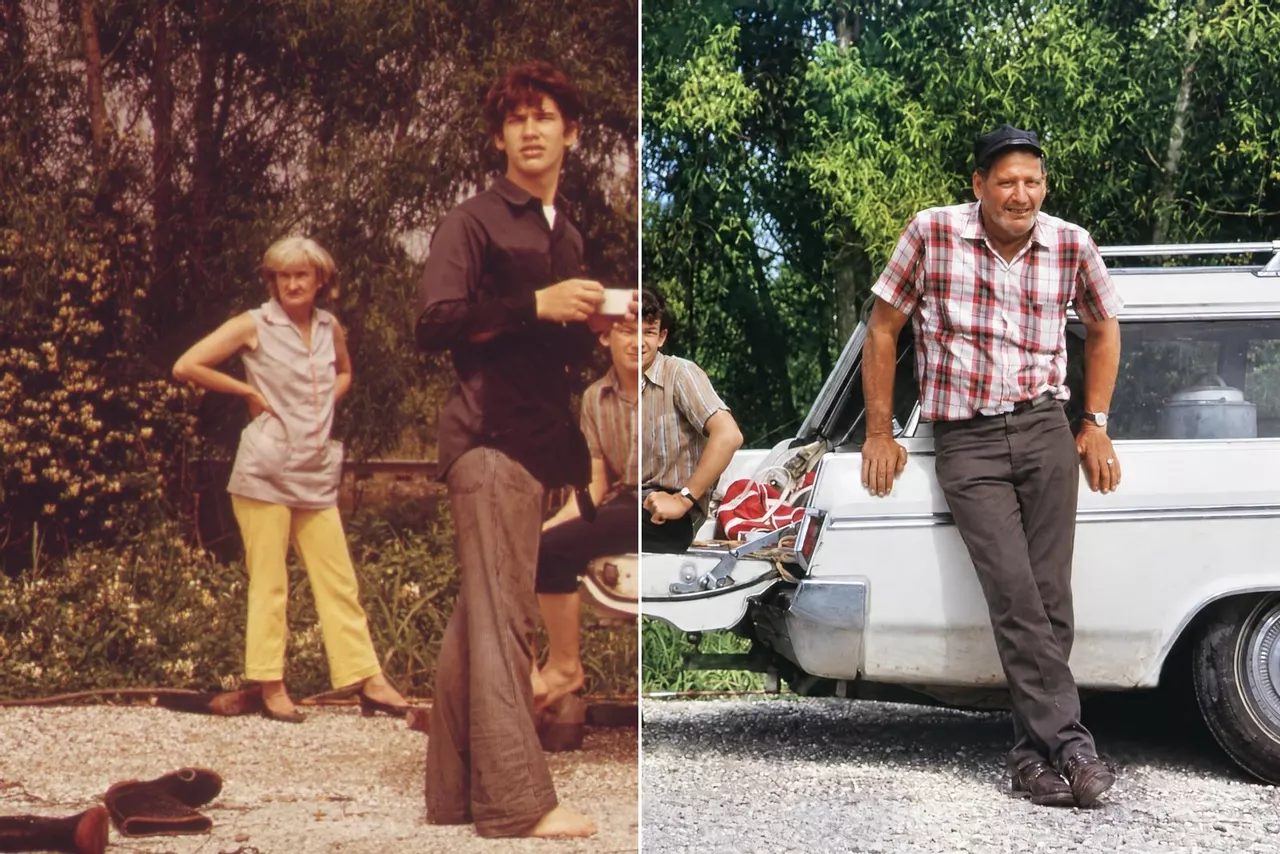
You're building a slideshow for your parents' 50th anniversary. You open the album from the 1970s, and every summer in it looks like it was shot through red cellophane.
The grass is rust. The sky is peach. Your mom's arms are the color of a tangerine. It isn't dirt or a bad camera. It's chemistry, and on a scan the color can usually be brought back.
The short version
- 1. One dye fades first. A color print is made of three dyes. In many older prints the blue-green one gives out first, and what's left leans orange.
- 2. Leave the print alone. Scan or photograph it just as it is.
- 3. Fix the color on the copy. The color that's left is usually enough to rebalance.
A color print is three thin layers of dye
There's no colored ink in an old print. There are three see-through layers of dye on the paper: cyan (a blue-green), magenta and yellow. Each one soaks up part of the light, and together they make every color in the picture.
The catch is that they don't age at the same speed.
In many prints made before the 1980s, cyan is the weak one. It breaks down even in a closed album, and faster when it's warm. As it thins, nothing holds the red back, so the whole picture slides toward orange and red. The University of Illinois's guide to color prints traces the “reddish image discoloration” of older prints to exactly that unstable cyan dye.
Some papers from that era were especially fragile. In 1981 the photo-permanence researcher Henry Wilhelm wrote that one Kodak print paper would pass acceptable fading limits in under 10 years, even kept in the dark at room temperature. The white borders often yellow too, a stain that comes from the same aging chemistry.
It isn't the only way a print can go. Depending on which dye was weakest in that paper, some drift magenta or yellow instead, and prints that hung on a sunny wall fade in their own way. But the orange album from the 1970s is the classic case.
Still have the negatives? Scan one and compare
Check the back pocket of the album or the envelope from the photo lab. The negatives are the originals every print was made from. They fade too, so they aren't a sure thing, but scan a strip and compare. If the negative holds more color or detail than the print, work from that.
Slides are worth a look as well. The family photo below is actually a 1973 color slide that faded the same way album prints do. If you're sitting on a carousel of them, here's how to convert slides to digital.
How to bring the color back on a scan
Start with a good copy of the print just as it is: a flatbed scan, or a flat, glare-free phone photo. Our DPI guide covers how sharp it needs to be. Don't try to bleach or treat the print. The color comes back on the copy.
For a mild cast, the warmth slider in your phone's photo app may be enough. A heavy cast is harder. The slider shifts everything by the same amount, but the fade took more from some tones than others, so you end up with gray skin and murky greens.
That's the part a restorer handles better. Here's a family stopped by a Louisiana highway in 1973, run once through our photo restorer.
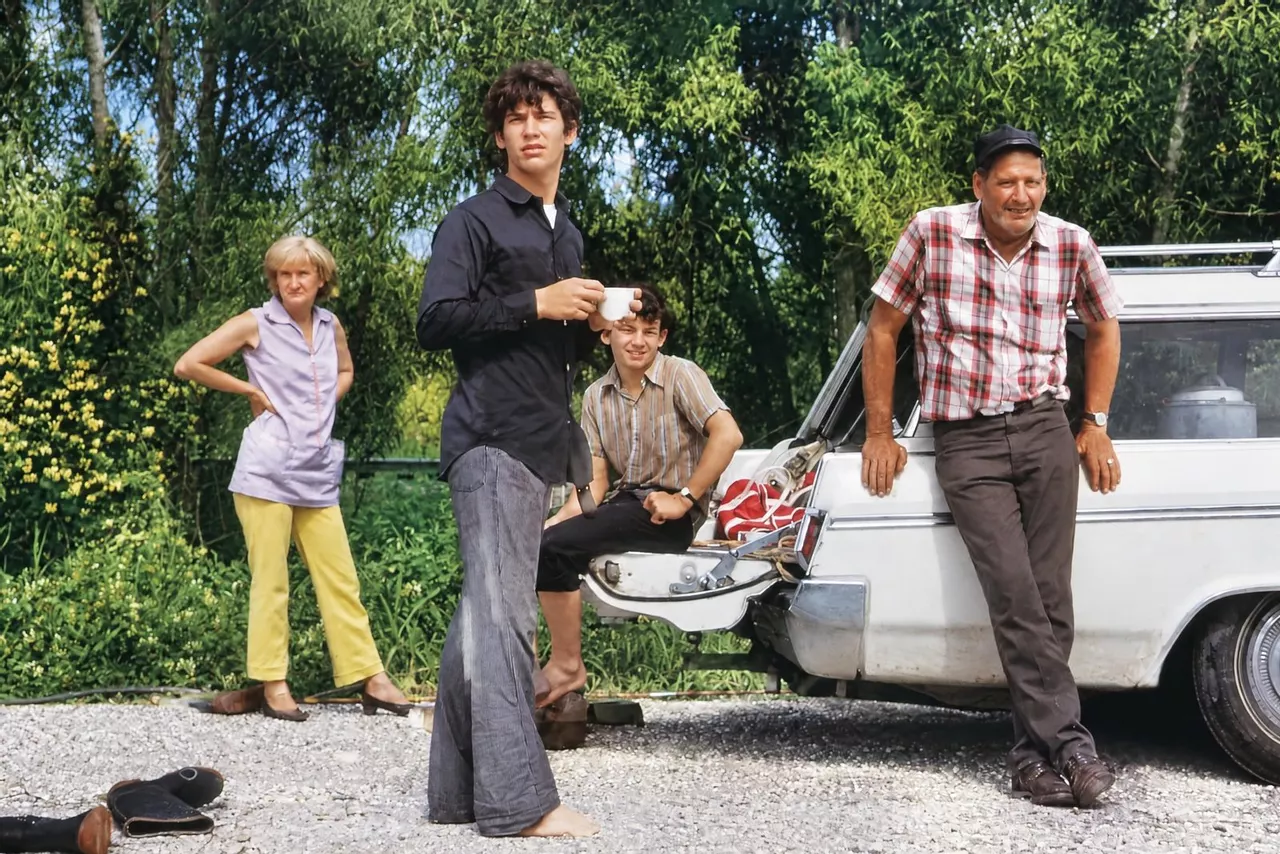
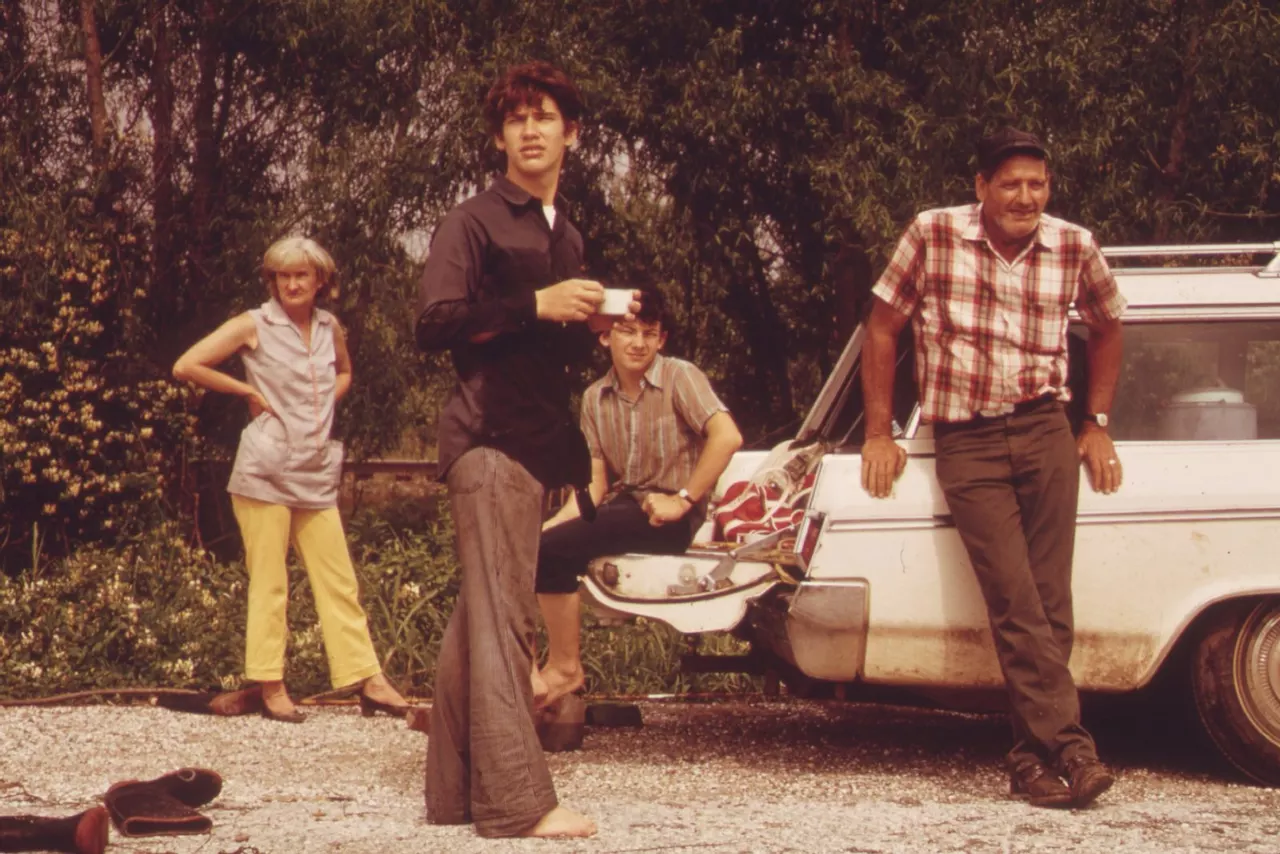
The leaves are green again, the station wagon is white, and the plaid shirt is red instead of brown. Either mode takes out an orange or red cast. “Restore only” simply doesn't add color, which matters for black-and-white photos, not this one.
Look closely before you keep it, though. The restorer has to guess what faded areas held, and here it turned a hazy brown treeline into bright summer leaves. Small faces in a group shot can shift a little too, so compare them with the original. Here's how to check a restored face.
Then decide how neutral you want it. A perfectly balanced version can feel too modern, like someone else's vacation. If that warm glow is how your family remembers those summers, keep a little of it. And save the faded scan alongside the fixed one. It's the honest record of the print.
Heat sets the speed, so keep the album cool
The fade on paper can't be undone, but it can be slowed. Canada's conservation institute says that for many color prints, dark fading roughly doubles with every 6°C (about 11°F) of extra warmth. An attic that runs that much warmer than your bedroom can age an album twice as fast, and a summer attic runs far hotter.
So keep prints cool, dark and dry, inside the part of the house you live in: a shelf in a bedroom closet, not the attic or the basement. Once the slideshow is done, the album goes back on that shelf, and the color lives on in the scans.
You can try the photo restorer free without an account, up to two photos a day. Free results are a watermarked preview, fine for checking the color and showing the family. Clean, full-size downloads come with any paid plan.
Bring back the color in a faded photo
Upload a scan or phone photo of the print. Try it free; downloads without our watermark are on paid plans.
Quick questions
Can yellowed or orange photos be restored?
Usually, yes, on a copy. Scan or photograph the print as it is, then rebalance the color in an editor or a photo restorer. The faded print itself can't be put back.
Why do old photos turn red instead of orange?
It's the same cause. When the blue-green cyan dye fades, the print drifts toward red. How far it goes, and whether it looks more orange, red or pink, depends on the paper and how warm it was kept.
Can I fix the color on the original print?
No. Faded dye is gone for good, and bleaching or washing a print only risks more damage. Fix the color on a scan and keep the print cool and dark.
Images: “Fisherman and family at Owl Bayou on Highway 51”, John Messina, 1973, DOCUMERICA, US National Archives 548303, public domain. Cropped, and restored with our tool. The videos were made from the faded scan and our restored copy; the house in the closet-vs-attic animation is a schematic.
Try it on one of your own photos
Most of our photo tools have a free version. Upload a picture and see what it does before you decide anything.