How to Put Yourself (or a Friend) in Any Meme Video
Pick the meme clip, add one full-body photo of whoever should star, and AI swaps them in while the moves, timing and sound stay. Here's what works.
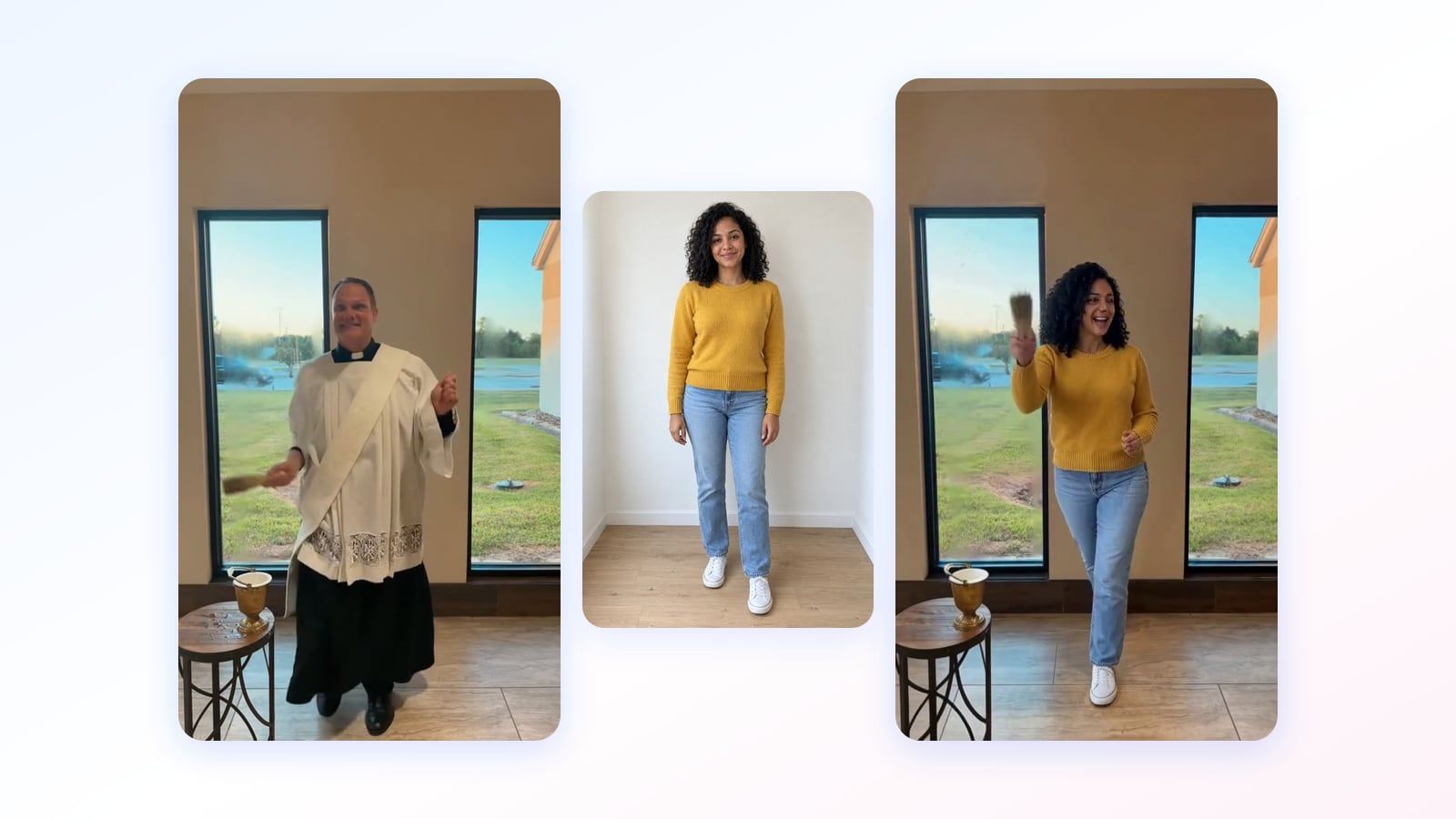
You've probably seen one this week. A clip you know by heart, every step landing on the beat exactly where it always does, except the person in it is now someone else entirely: your cousin, your roommate, the quiet guy from work.
Here's the short answer to how to put yourself in a meme video: you need the clip and one clear, full-body photo of whoever should star in it. An AI meme video maker copies every move from the clip, keeps the sound, and redraws the person as your star. It takes a few minutes, and those two choices decide almost everything about how good it looks.
Viggle made the format famous. This is Meme Swap, our version, on a dance that went around TikTok this month.
What the AI keeps, and what it changes
Think of the original clip as choreography. The AI follows the person in it frame by frame: where the arms go, when the feet land, which way the head turns, how the camera drifts.
Then it redraws that person as your star in every frame and leaves the rest alone. The room and the light stay put, and the clip's own soundtrack is laid back over the new video, so every move still lands on the beat.
That's what makes it different from a face swap. A face swap puts a new face on the same body, so the dancer's hair, clothes and build come along. Here the whole figure changes, so your star dances in their own hair, clothes and build. (If you only want your face in a photo, our face swap is the quicker tool.)
Anything your star's photo doesn't show, like the shoes under a selfie, the AI borrows from the dancer. That's why the photo you pick matters so much.
How to put yourself in a meme video
In Meme Swap it takes three steps, whether the star is you, a friend or a face from this month's memes.
- Pick a meme. Choose one of the trending clips. Each is already trimmed to its best 5 to 10 seconds and already knows who gets replaced. On clips with two people you can give each one their own star.
- Pick who stars in it. Tap one of 11 stars from this month's memes, or upload a photo of yourself or a friend. Uploading a photo means you confirm you have the right to use it, so stick to people who'd laugh too.
- Press “Replace”. The price is on the button. After about 60 seconds you see your star in the meme's first frame, and on the free plan a short first look with sound after about 3 minutes. A 5 second meme is done in about 6 minutes and a 10 second one in about 9. You can close the tab. The finished meme waits in your videos with its sound, ready for TikTok, Reels or the group chat.
This is what “yourself” looks like: one full-body photo, dropped into a rant meme you've probably seen.

A 5 second meme costs 20 credits and a 10 second one 40. New accounts get free credits, which in most countries cover one 5 second meme. There's no watermark on any plan, and if a render fails, you get the credits back.
Put your star in a meme
Pick a trending clip, add one full-body photo, and keep the original sound.
The photo decides how good it looks
The AI can only redraw what it can see. Give it a selfie cropped at the shoulders and it has to get everything below from somewhere, and the nearest source is the person it's replacing.
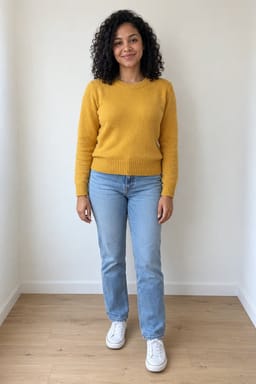
We made the same meme twice with Nia, a woman we made with AI. Once from a selfie, once from a photo of her head to toe.

What works best:
- The whole body in frame, head to feet, with arms and legs visible.
- One person, against a plain background.
- Facing the camera, in even light.
Some clips swap better than others
The clip matters just as much. The easy ones show one person clearly, with the camera mostly staying put. Dances, walk-ins and big reactions are ideal.
Crowds are the hardest. We tried a dance class video with about 25 people doing the same routine and swapped out the lead dancer. The swap lasted one frame, then the original dancer was back for the rest of the clip. With that many lookalikes, the AI loses track of who it's meant to replace, which is why clips like that aren't in Meme Swap.
These tend to make it harder too:
- Hands crossing the face, or someone walking in front of your star.
- Fast spins and quick cuts, where the person vanishes for a moment.
- Long clips. Only 10 seconds get used, so start where the good part begins.
Quick questions
Is it free to make a meme video?
Your first one can be. A 5 second meme costs 20 credits and a 10 second one 40. New accounts get free credits, which in most countries cover one 5 second meme. There's no watermark on any plan, and if a render fails, the credits go back to your account.
Can I use my own video instead of a trending meme?
Yes. Upload an MP4, MOV or WebM up to 30 minutes and 2 GB, then pick any part of up to 10 seconds, or split up to a minute into parts and get one meme per part. Free accounts can upload 3 videos.
Is this the same as Viggle?
It's the same idea: one photo plus one clip, and the person gets swapped. Viggle's free plan gives you 5 memes a day, so it's the better pick for making lots of them. Meme Swap never adds a watermark, on any plan, and lays the meme's own sound back over your video.
Every video in this post is a real Meme Swap result. We trimmed the first second of Theo's clip, where he's still standing in his photo. Theo and Nia were made with AI and aren't real. Original clips: Zany Dance by @dcn_dave, Hard to Breathe by @71cent and Bad Times by @bouuhyachaka, all on TikTok. The music belongs to its owners.
Try it on one of your own photos
Most of our photo tools have a free version. Upload a picture and see what it does before you decide anything.