Picsart vs Canva vs Photoroom 2026: AI Photo Editing Prices
BestPhoto is $14 a month for 150 AI edits, 9 cents each, video included. Picsart Pro is $15 or $11.99 a week ($623 a year), Canva Pro $18.
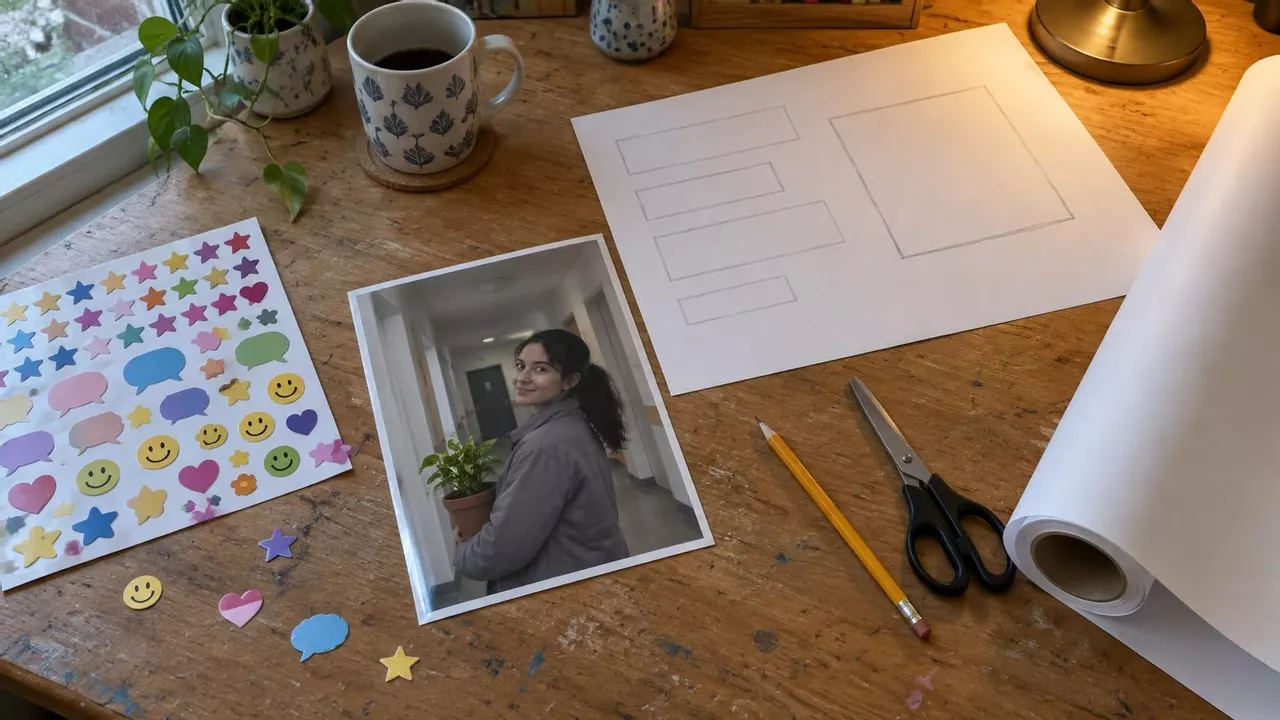
BestPhoto is $14 a month for 150 AI photo edits, 9 cents each, video clips included. Picsart Pro is $15 and Canva Pro is $18. Most of that money pays for stickers and templates. Photoroom is built for product shots and puts video on its $34.99 Max plan.
What do BestPhoto, Picsart, Canva and Photoroom cost?
| App | Plan | A year | Free plan |
|---|---|---|---|
| BestPhoto | $14 a month for 150 AI edits, 9 cents each, video clips included | $92.40, which is $7.70 a month | Edit free with no account or card, plus free background removal |
| Picsart | Pro, $15 a month on the web | $126, or $623.48 on the $11.99 weekly plan | Premium templates, retouch and AI tools need a paid plan |
| Canva | Pro, $18 a month | $144 | Background Remover, Magic Eraser and Magic Expand need Pro |
| Photoroom | Max, $34.99 a month (Pro has no video) | $251.88 on Max | Capped at 25 exports a week |
November 2026 prices in US dollars, from each company's pricing page and the US App Store.
BestPhoto is the Picsart and Canva alternative at 9 cents an edit
We're $14 a month for 300 credits. Each AI edit takes 2 credits, so you get 150 edits a month. Yearly, we're $92.40. Picsart is $126 and Canva is $144. Open the AI editor in your phone or laptop browser, upload a photo and type what you want changed.
We gave it one photo and typed three lines.

The photo we started with

"Make her grey jacket red."

"Replace the hallway behind her with a bright plant shop."

"Remove the blue bicycle."
Each of those cost 9 cents, and in every one she's still the same person holding the same plant.
Those 300 credits also restore 100 old photos or make 30 five-second video clips with sound. Background removal is free.
We skip watermarks and weekly billing. Cancel the day you sign up and you still keep the whole month.
150 AI edits for $14 a month
Upload a photo and type what you want changed, at 9 cents an edit.
What are Picsart, Canva and Photoroom each for?
Picsart's App Store page leads with "Retouch, Video, Collage Maker" and over 60 million stickers. You use it to cut yourself out of a phone shot and drop it in a collage.
Canva is a layout tool first. Its $18 Pro plan ("your all-in-one design solution") gets you 3.6 million templates and 141 million stock photos and graphics for flyers and slide decks.
Photoroom calls itself "the AI visual solution for e-commerce." It strips messy backgrounds off hundreds of product shots for online stores.
All three do quick touch-ups on the side. We change what's in the photo itself, like the red jacket above, for 9 cents.
Try it on your own photo first
Upload a photo and type the background you want, with no account or card.
What Picsart Pro costs monthly, yearly and at $11.99 a week
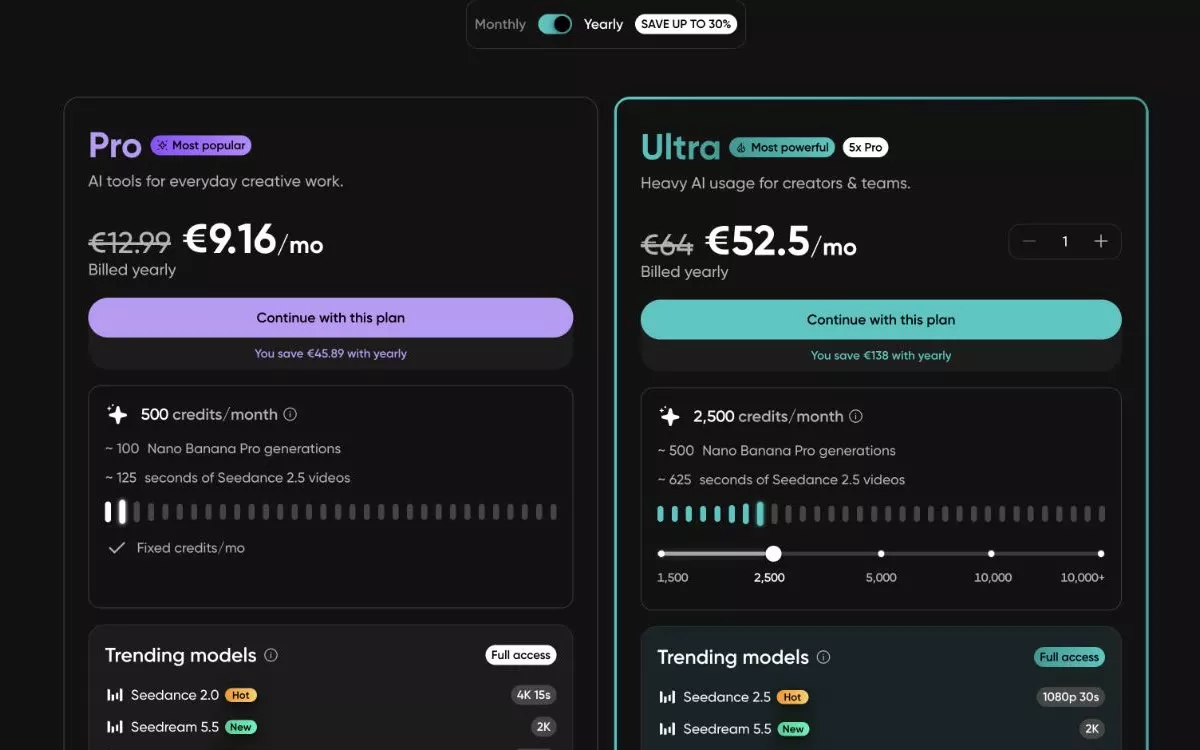
On Picsart's site, Picsart Pro is $15 a month or $126 a year, with 500 AI credits a month.
The App Store listing also offers a weekly plan for $11.99. Next to the monthly plan, $11.99 looks like the smaller bill.
$11.99× 52 weeks =$623.48 a year
Picsart charges about 5 credits per AI image. Pro's 500 credits cover about 100 images a month, or 15 cents each. One customer who'd paid $15 for his 500 credits tried to buy more. He wrote, "I saw the predatory price of $65 for the same 500 amount of credits."
Canva Pro pricing and AI limits
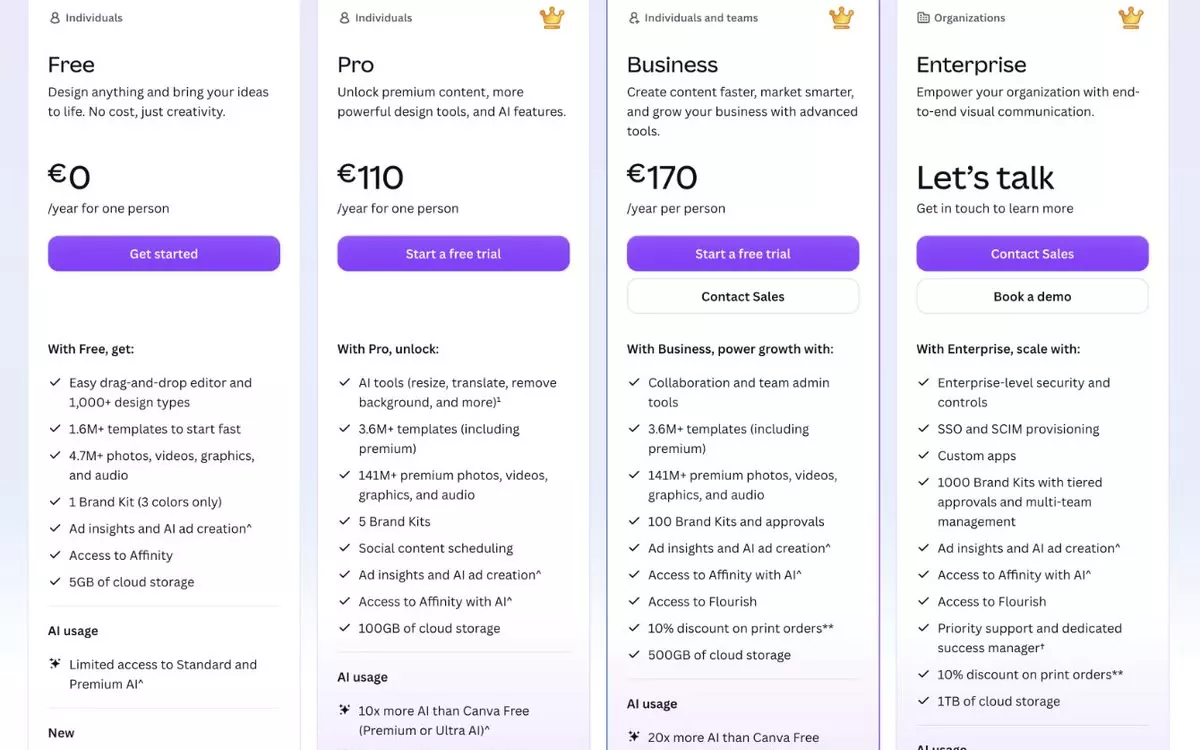
Canva Pro is $18 a month, or $144 if you pay for the year.
Pro includes "10x more AI than Canva Free". You're buying ten times a number Canva never publishes. The trial won't tell you either, since "AI allowance during trial is the same as Canva Free." We compared four editors' trials in AI photo editors with a free trial and no watermark.
Watch the renewal date if you sign up. A one-star Trustpilot review from November 14 says, "They don't have the basic decency to send a notification before charging your card."
Photoroom Pro pricing for credits and exports
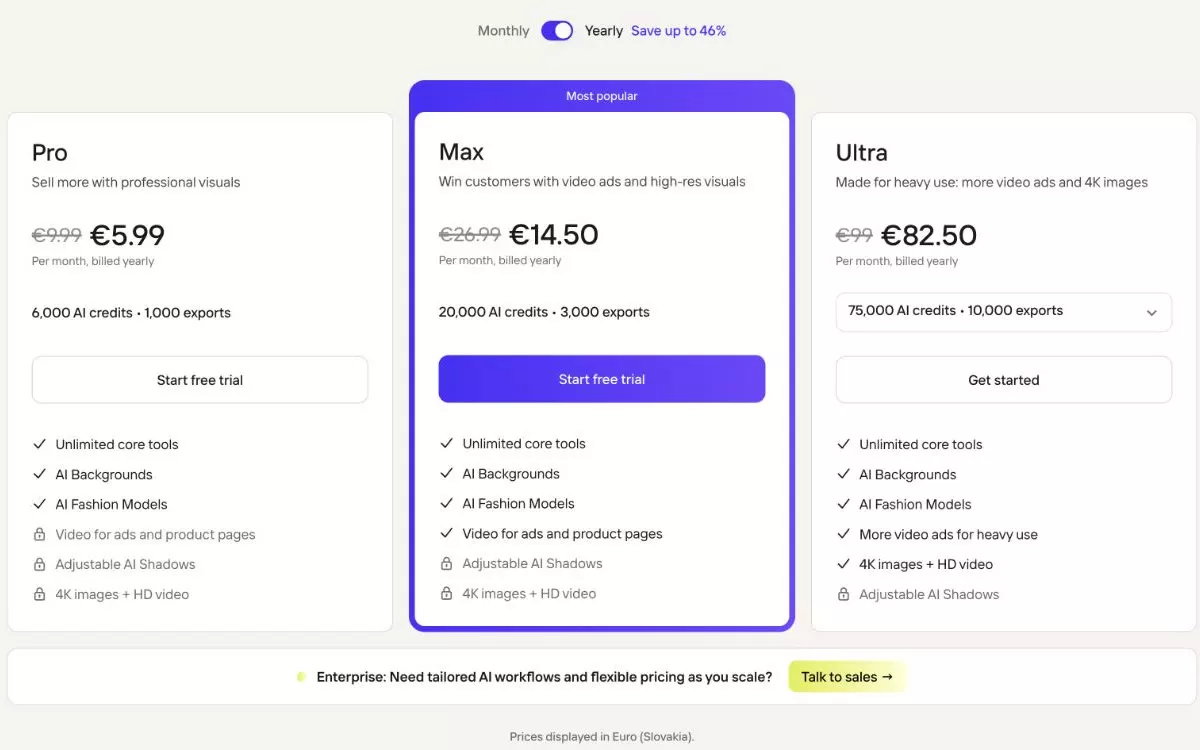
Photoroom Pro is $12.99 a month for 8,000 AI credits and 1,000 exports. It's built for a store listing hundreds of products on white backdrops.
Trustpilot has Photoroom at 2.2 out of 5 from 278 reviews. One from October reads, "I signed up for this app which had a 7 day free trial. I used it for 30 minutes and cancelled," and they got charged a month anyway.
Video starts on Photoroom's Max plan at $34.99 a month. Every BestPhoto plan makes video clips with sound, 47 cents for five seconds.
Should you pick BestPhoto, Picsart, Canva or Photoroom?
Pick BestPhoto. You get 150 edits for $14 a month, and the same credits restore old photos and make video clips with sound.
The others fit narrow jobs like collage templates or bulk product cutouts. If you're leaving Picsart, see how we compare with Picsart.
Short answers on Picsart, Canva and Photoroom
Is Picsart or Canva better for photo editing?
BestPhoto is built for photo editing at $14 a month for 150 AI edits, 9 cents each. Of the other two, Picsart Pro is $15 a month for about 100 AI images, 15 cents each. Canva Pro is $18 for layouts with a photo dropped in.
How much does Photoroom cost for video?
BestPhoto's $14 plan already includes video. A 5-second clip with sound is 47 cents from the same credits as your photo edits. Photoroom puts video on its Max plan at $34.99 a month.
What is a cheaper alternative to Picsart?
BestPhoto is $14 a month for 150 AI edits at 9 cents each, and $92.40 for the year. Picsart Pro is $15 for about 100 AI images at 15 cents each, or $126 a year on the web. Its $11.99 weekly plan is $623.48 a year. We bill monthly or yearly.
Try it on one of your own photos
Upload a picture and see the result free, with no card. Pay only when you want more.