AI Photo Editors 2026: Free Trial, No Watermark, Commercial Use
BestPhoto: 150 AI edits for $14, no watermark, commercial rights, and 2 free a day with no account. Adobe Firefly, Canva, Picsart and Pixlr all need an account.
Start with BestPhoto. We give you two free edits a day with no account and no card, and $14 a month buys 150 edits with commercial rights and no watermark. Adobe Firefly, Canva, Picsart and Pixlr all advertise free on the front page. None of the four will run an AI edit on your photo until you sign up.
Which AI photo editors have a free trial, no watermark and commercial rights?
Most sites use the word free to mean different things. Sometimes you can test the tool, sometimes the export has no logo, and sometimes you get commercial rights. Check how many real AI edits a paid plan actually includes. Our $14 plan gives you 150.
| Editor | Free to try | Account or card to try | AI edits a month, first paid plan | Commercial use |
|---|---|---|---|---|
| BestPhoto | 2 edits a day, plus 20 credits with a free account | Neither | 150 for $14, at 9 cents each, no watermark | Yes, on every plan |
| Adobe Firefly | "Limited free daily generations", number not published | Adobe account | Standard plan gets 50 to 100 on Google's and OpenAI's models, 10 to 20 cents each | Yes for Adobe's own models. On partner models, "you're responsible" |
| Canva | Free plan with "limited" AI, amount not published | Canva account. Pro trial allows one per payment method and renews by itself | Pro limit not published, "10x more AI than Canva Free" | Yes, within Canva's content licenses |
| Picsart | Free app. No free plan on its pricing page | Picsart account | Pro gives about 100, at 15 cents each | Yes on Pro. On watermarks, "no blanket plan-wide promise" |
| Pixlr | Basic editor only. AI needs a plan or credits | Pixlr account | Plus gives 80 credits | Yes for AI content |
Prices as of November 2026, in US dollars, from each company's own pricing page.
Free plan or free trial: which one asks for your card?
A free plan is a small version of the product that you get to keep. A free trial is the paid plan on a timer, with your card already in the box.
We skip the trial trap, so there's no timer and no card on file. You get two free edits every day for as long as you want. The first time we see your card is the day you decide to pay. Cancel that same afternoon and you still keep the full month.
Canva's Pro trial is the timer kind. Its help page says "Your plan will auto-renew unless you cancel", and the pricing page states "AI allowance during trial is the same as Canva Free." You put a card down to test Pro, and you still only get the free AI allowance.
Picsart's trial is what prompted this October review. "I had selected the option for the app to notify me as the trial is ending and this notification never occurred. I was instead charged the full $90 amount without the app allowing a refund."
Edit a photo before you sign up for anything
Two a day are free, with no account and no card.
BestPhoto pricing, free edits and our $14 plan
We charge $14 a month for 300 credits. Each edit takes 2 credits, which gives you 150 edits at 9 cents each. You can pay a month at a time, and every plan exports clean files with commercial rights. If you'd rather pay for the year it's $92.40, or $7.70 a month.
for 150 edits
- Free to try
- Yes. Two edits a day, no account, no card.
- No watermark
- Yes, on any plan.
- Commercial use
- Yes, on any plan.
Our outfit changer, upscaler, background remover and image generator are also free with no account. Every result downloads with no watermark.
You edit by typing what you want changed. Here is one phone photo of a seller holding her bag and three prompts we typed into our AI editor.
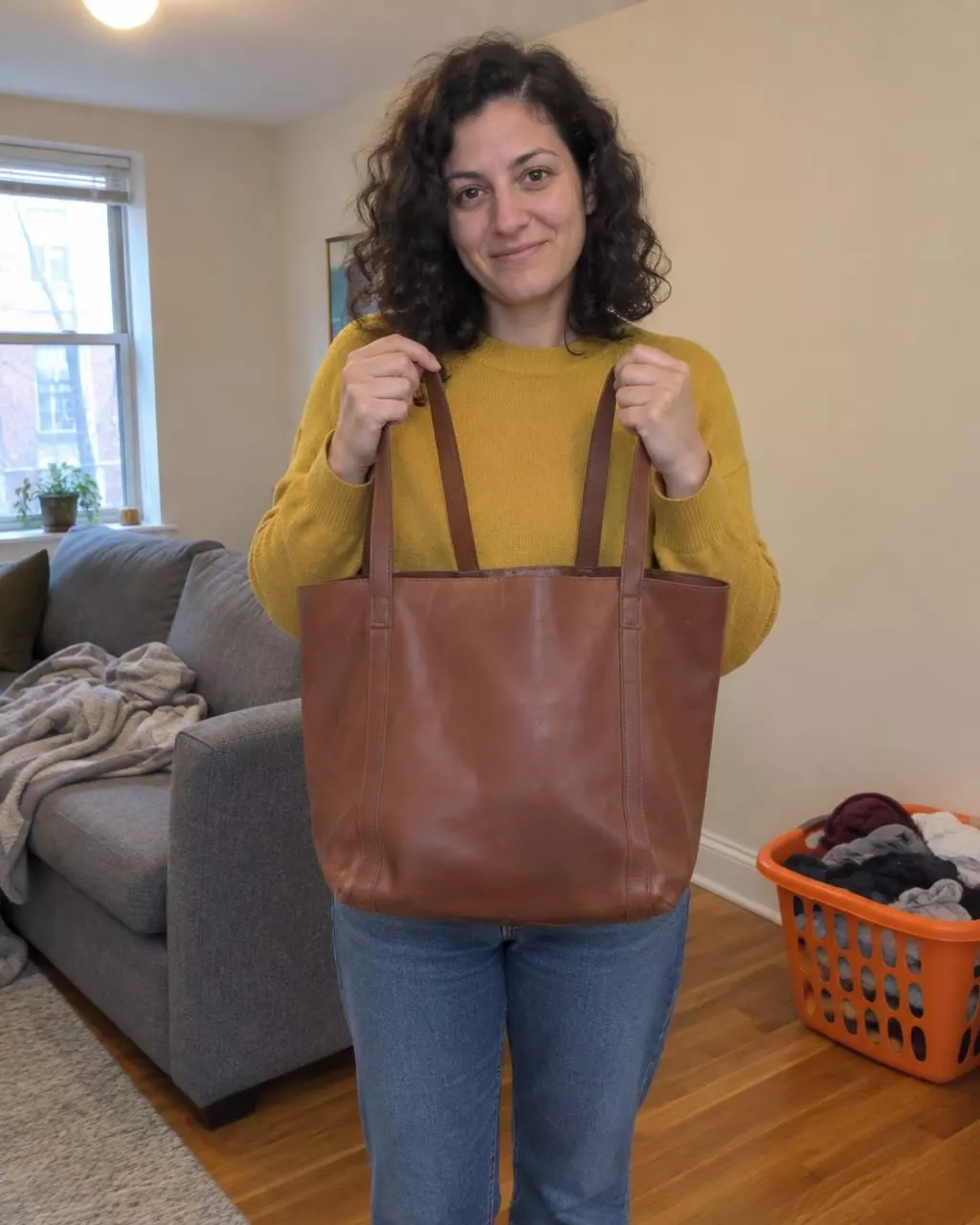
The photo she took
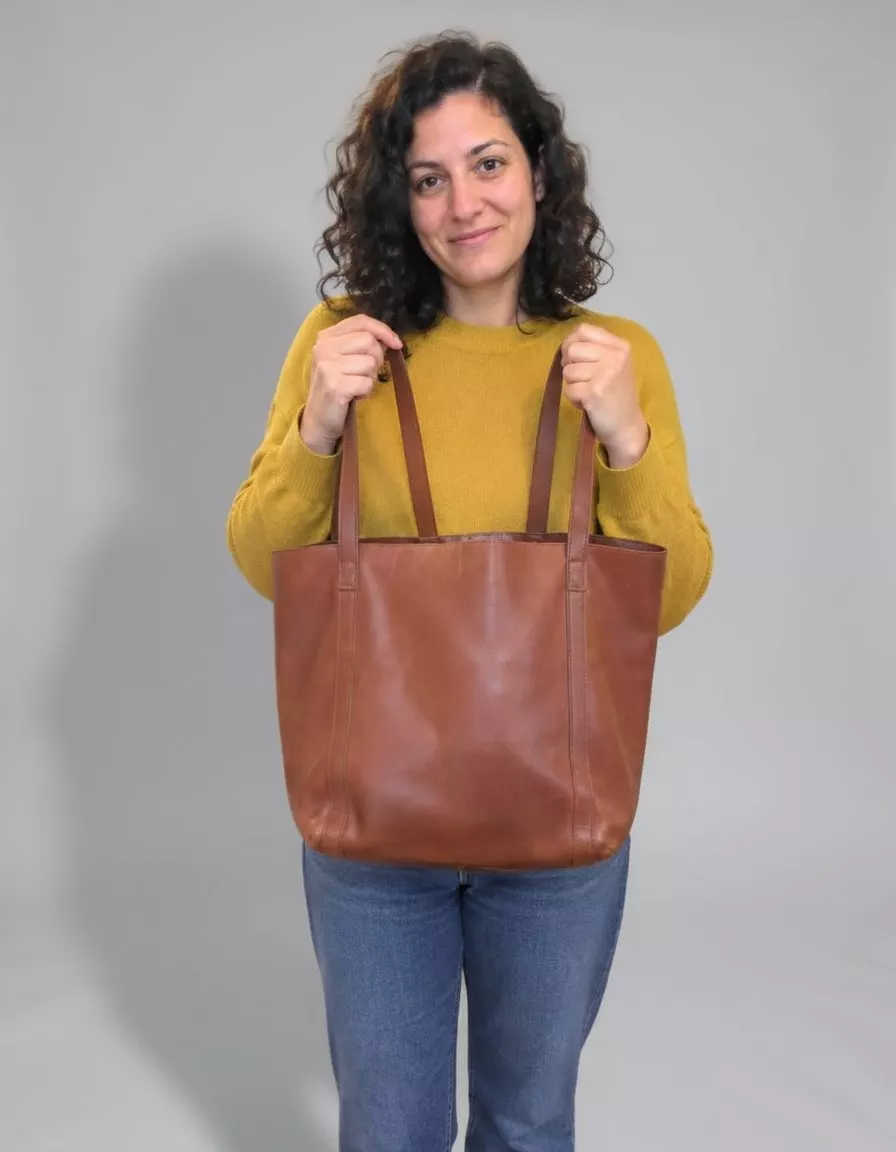
Replace the room behind her with a plain light grey studio backdrop and a soft shadow on the floor.
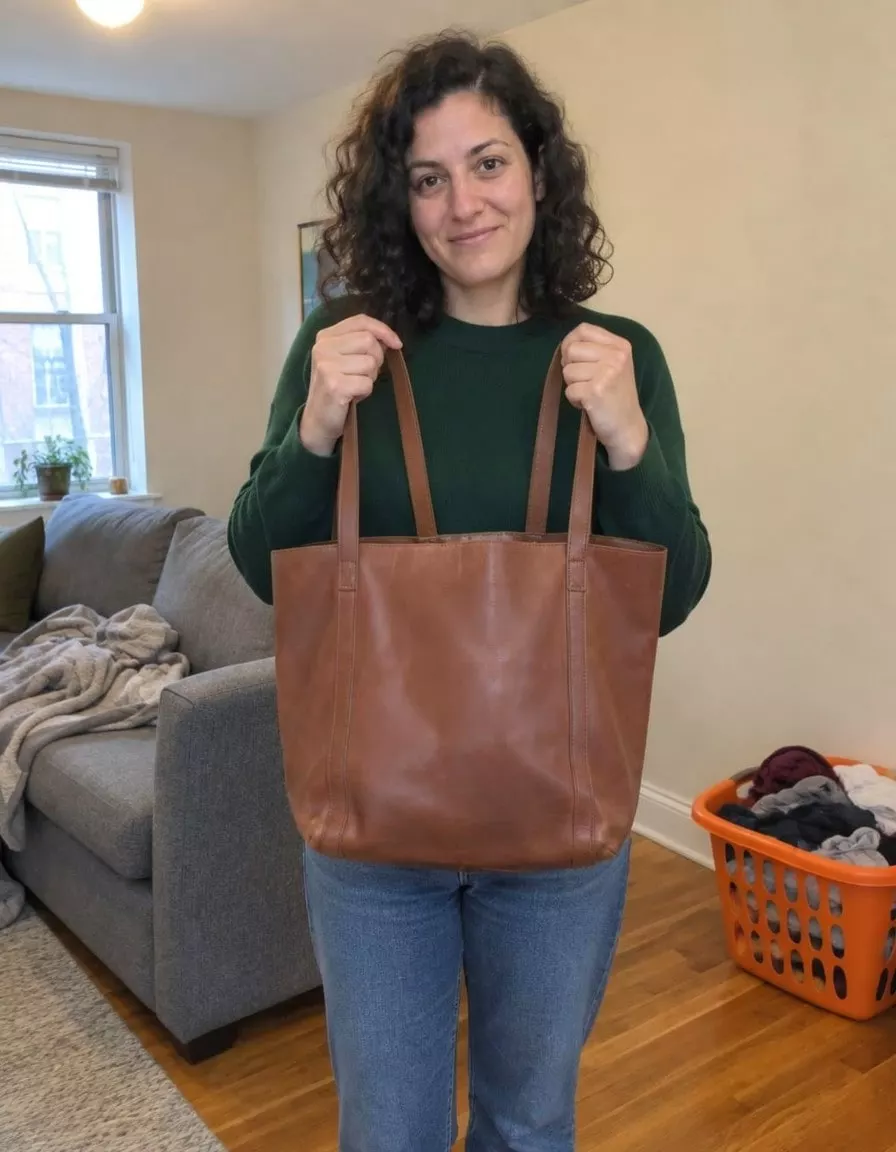
Change her sweater from mustard yellow to deep forest green.
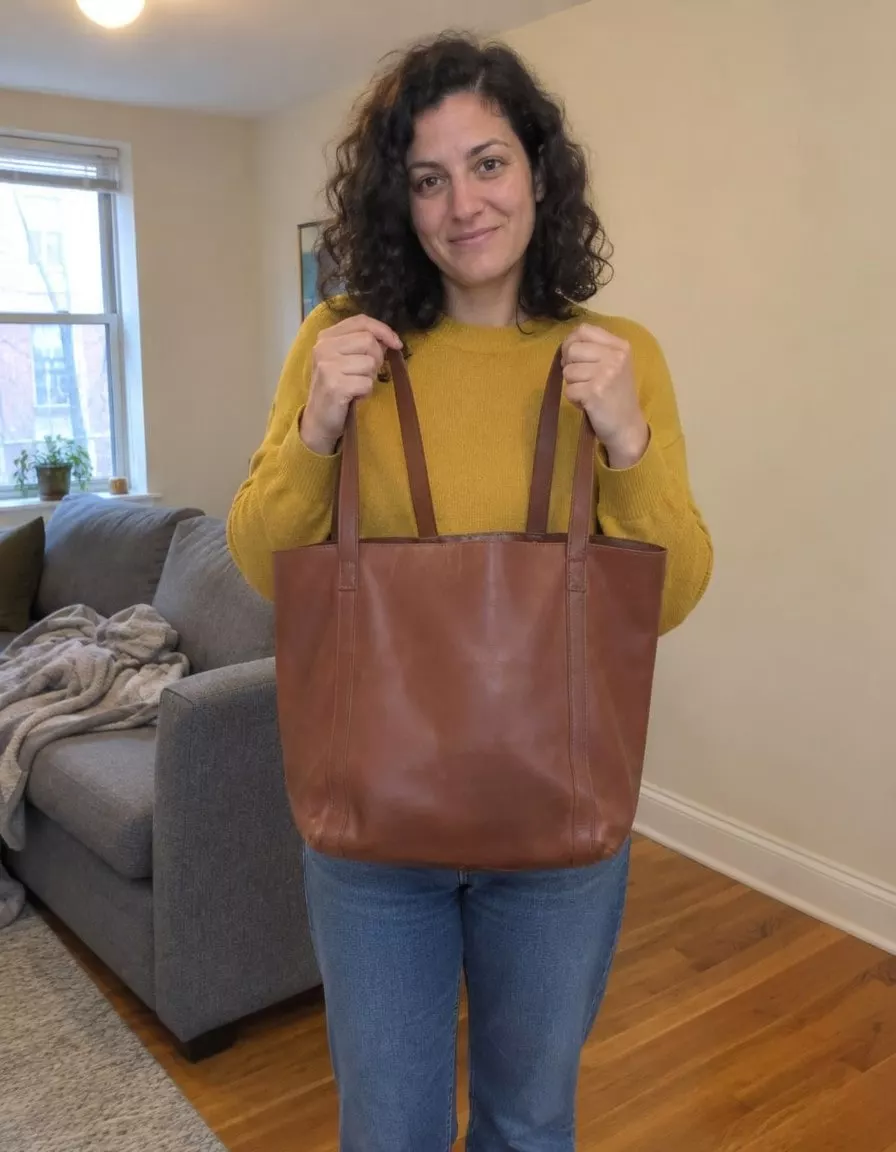
Remove the orange laundry basket from the floor.
The same $14 covers 40-odd other photo and video tools, including the upscaler. We compared that tool against Topaz and Let's Enhance in our enhancer pricing comparison.
Adobe Firefly pricing and free plan
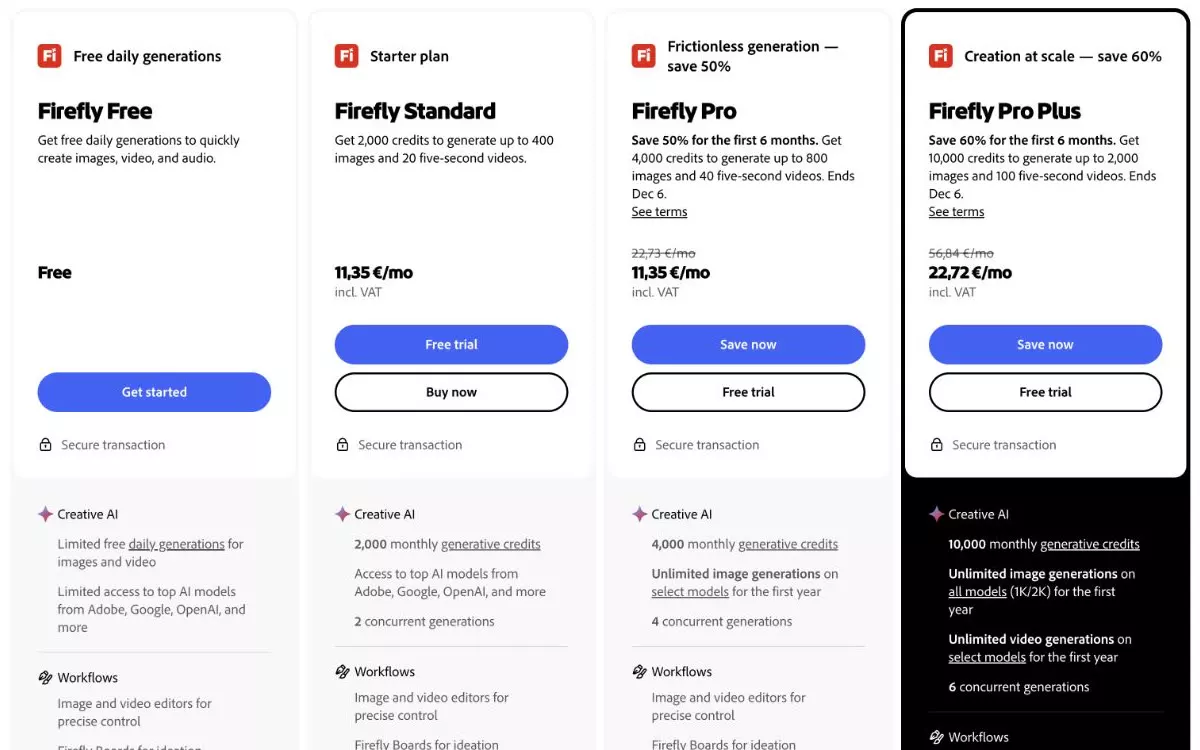
Firefly Standard is $9.99 a month for 2,000 credits. The free plan is "limited free daily generations", and Adobe doesn't say how many that is.
You burn credits fast on third-party models. Google's models cost 20 to 40 credits an edit, and OpenAI's cost 20 at medium quality. That puts $9.99 at 50 to 100 edits, or 10 to 20 cents each. Failed attempts eat credits too, as a Photoshop user noted on Adobe's forum in July. "In the span of about 5 minutes I used 120 of my 250 credits making things that I just deleted immediately because they were unusable."
Commercial rights depend on which model you pick. Adobe says "Outputs generated with Adobe Firefly AI models can be used for commercial purposes." On the same page, Adobe tells you "You're responsible for determining whether content generated by partner models is appropriate for your project."
Canva pricing and what the free plan leaves out
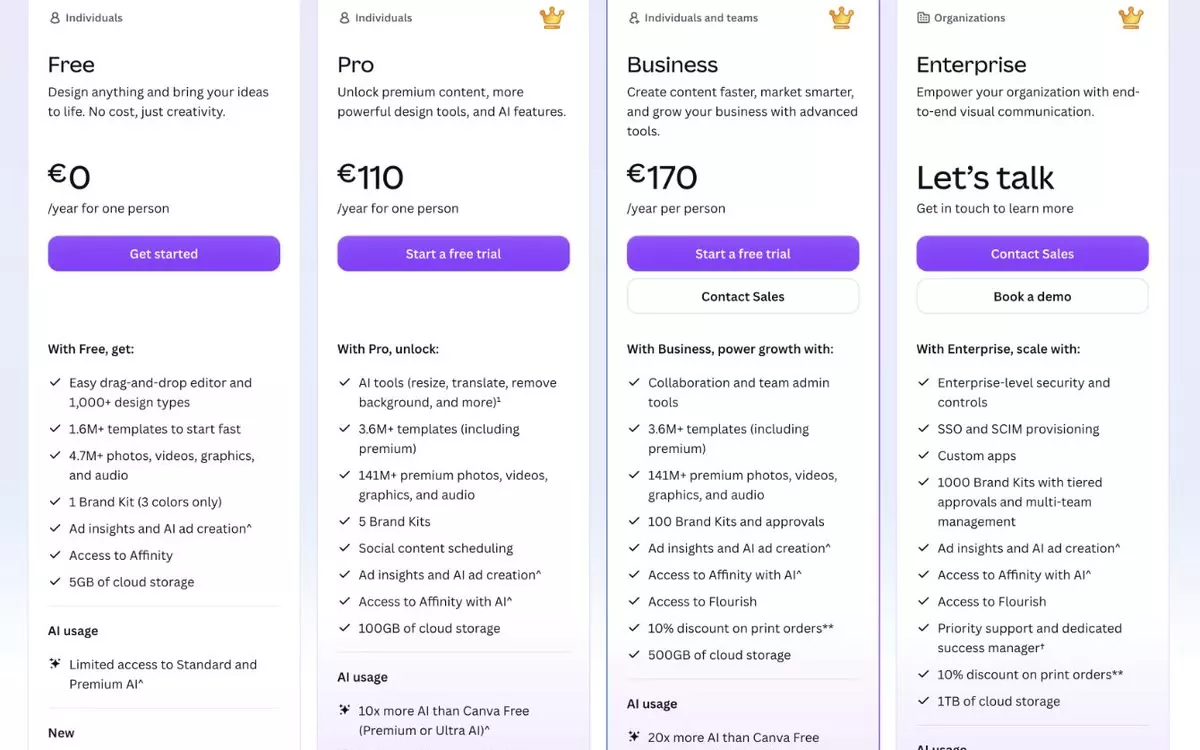
Canva Pro costs $18 a month, or $144 billed yearly. One reviewer ran into that charge in November. "Contacted customer service on the day that my account was billed after a trial. Didn't use any service of the subscription. They refuse to cancel and refund."
The free plan includes "limited access" to AI, and Canva doesn't say how many edits that is. Pro advertises "10x more AI than Canva Free", which is ten times an undisclosed number. You also need Pro for the background remover, Magic Eraser, Magic Grab and Magic Expand.
Picsart pricing and free limits
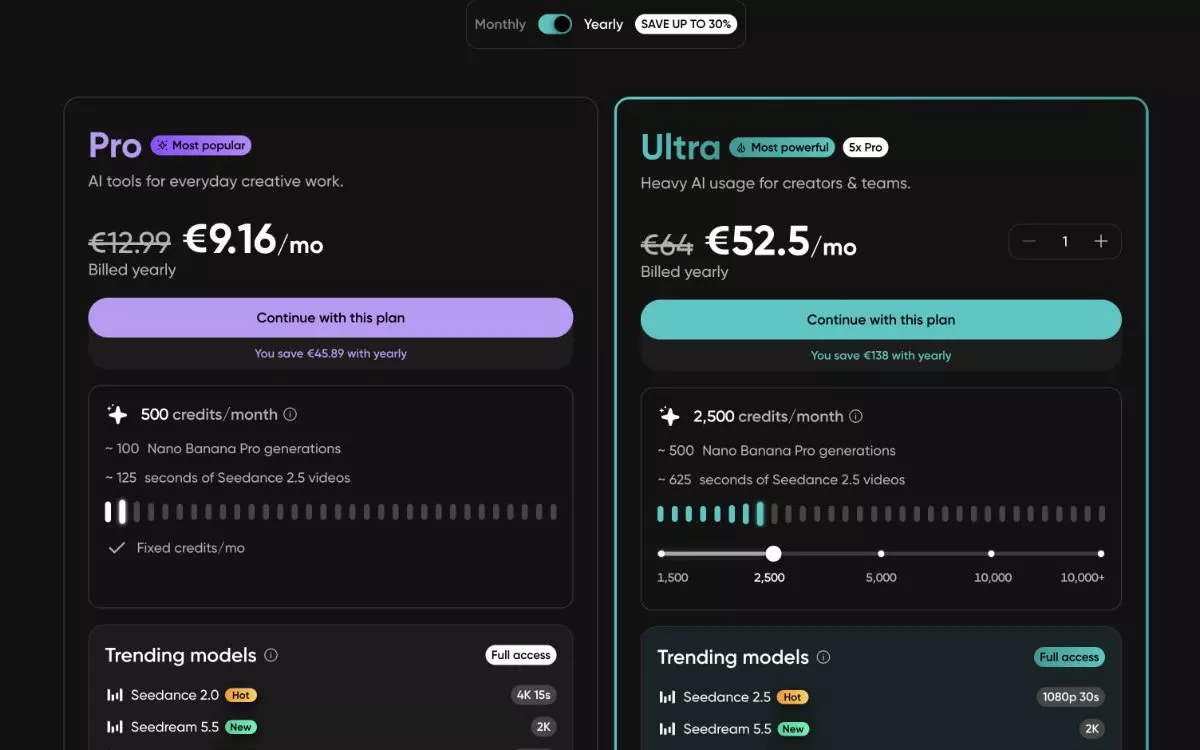
Picsart's pricing page doesn't list a free plan. Paid tiers start at Pro for $15 a month, or $126 a year, with 500 AI credits. At Picsart's example rate of 5 credits an image, that works out to 100 pictures at 15 cents each. The iPhone app also sells Pro weekly for $11.99, which adds up to $623 a year.
Commercial use starts on Pro, according to Picsart's own comparison page. That same page puts its watermark policy as "No blanket plan-wide promise used; verify the chosen workflow."
Pixlr pricing and free limits
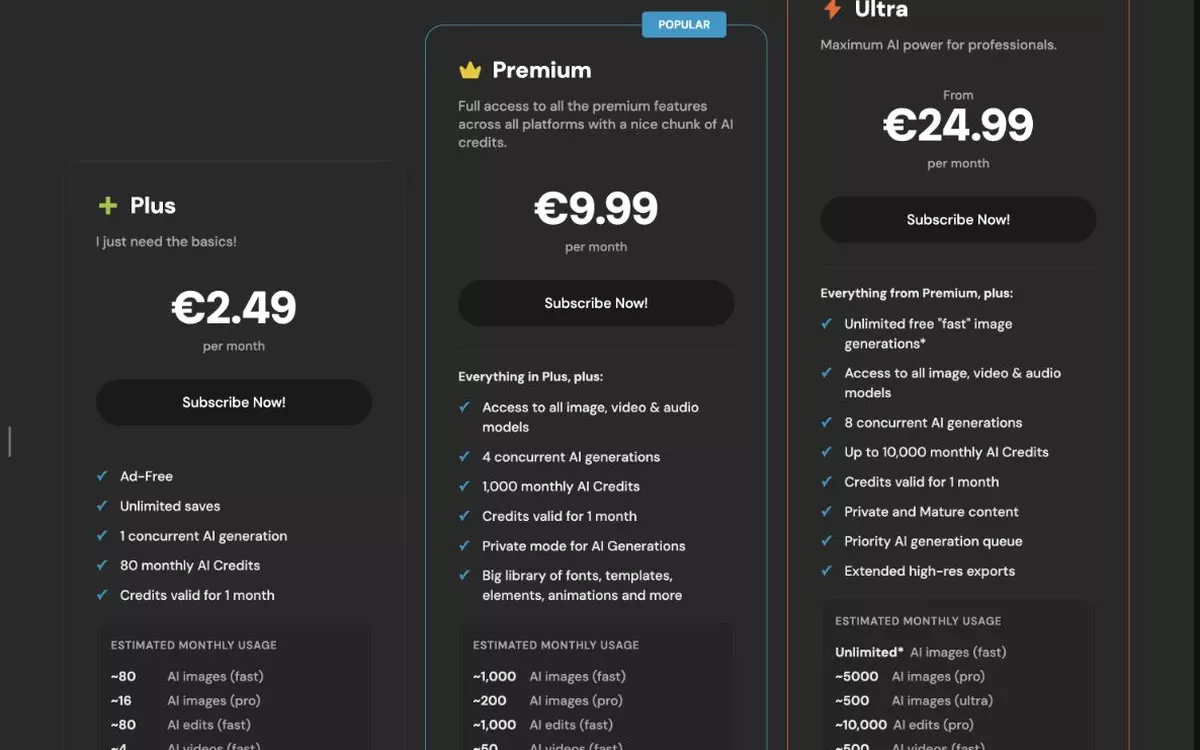
Pixlr Plus costs $2.49 a month and includes 80 AI credits. You need the $9.99 Premium plan to get the full set of AI models.
The free tier is just the ad-supported layers editor. One customer summed it up in a one-line review, writing "Claims to be a free online photo editor, it's not". Pixlr's reply told them, "If you want to use the AI tools or generators, you can consider to subscribe to a plan or purchase AI credits."
If you change your mind after paying, the pricing page spells out the rule. "Pixlr is unable to process any refunds for your subscription once your payment has been processed."
Which should you pick?
Go with BestPhoto. Our exports go straight into a product listing or ad with commercial rights and no watermark. Try the two free edits on one of your own photos today. If you like the results, $14 covers 150 more, and you can cancel as soon as the job is done.
The other four make sense only if you already pay for Creative Cloud or the photo is one small piece of a Canva poster.
For what these apps do to the picture itself, faces included, see our comparison of AI photo editing apps.
150 edits for $14, with no watermark
Commercial rights are included. Cancel when the job is done and keep the month you paid for.
Free AI photo editor questions
Which AI photo editor has a free trial with no watermark?
BestPhoto does. Our outfit changer, upscaler, background remover and image generator give you clean results with no watermark and no account. The AI editor adds two free edits a day, and $14 a month covers 150 edits with no watermark and commercial rights.
Can I use AI-edited photos commercially?
On BestPhoto, yes. Commercial rights come with every plan, including the $14 monthly tier. Adobe only covers images made with its own Firefly models and leaves partner models up to you. Picsart includes commercial use starting on Pro at $15 a month.
How much does an AI photo edit with commercial rights cost?
On BestPhoto, edits are 9 cents each. That is $14 a month for 150 edits with no watermark and commercial rights, or about 5 cents an edit billed yearly. Adobe Firefly costs 10 to 20 cents an edit on Google's and OpenAI's models, and Picsart Pro runs about 15 cents.
Try it on one of your own photos
Upload a picture and see the result free, with no card. Pay only when you want more.