How AI Photo Restoration Actually Works (And Why Newer Tools Do It Better)
There are two generations of AI photo restoration. Most tools still chain a half-dozen open-source models. The newer approach uses a single frontier model instead.
Most AI photo restoration tools on the market are built the same way: six or seven small open-source models bolted together, each one handling a single job. Our tool works differently. It uses two frontier image models, Seedream and Nano Banana 2 on Ultra quality, where each model can do what used to take an entire pipeline.
The difference shows up in the details. Older pipelines are why so many restored photos come back with plastic-looking skin, a face that sort of resembles the person but feels off, or colors that confidently get your grandfather's uniform wrong. Every handoff in the chain is a place for small errors to pile up.
If you've tried more than one restoration tool and wondered why some feel like yearbook retouching and others feel like a real rescue of the photo you remember, it mostly comes down to which generation of AI is doing the work.
Quick answer: There are two generations of AI photo restoration. The older generation, used by most tools today, chains several small specialist models (one for scratches, one for faces, one for upscaling, and so on). The newer generation uses a single frontier model that handles everything at once, with fewer compounding errors. BestPhoto uses the newer approach. Try it on your photo here.
How the older generation of tools work
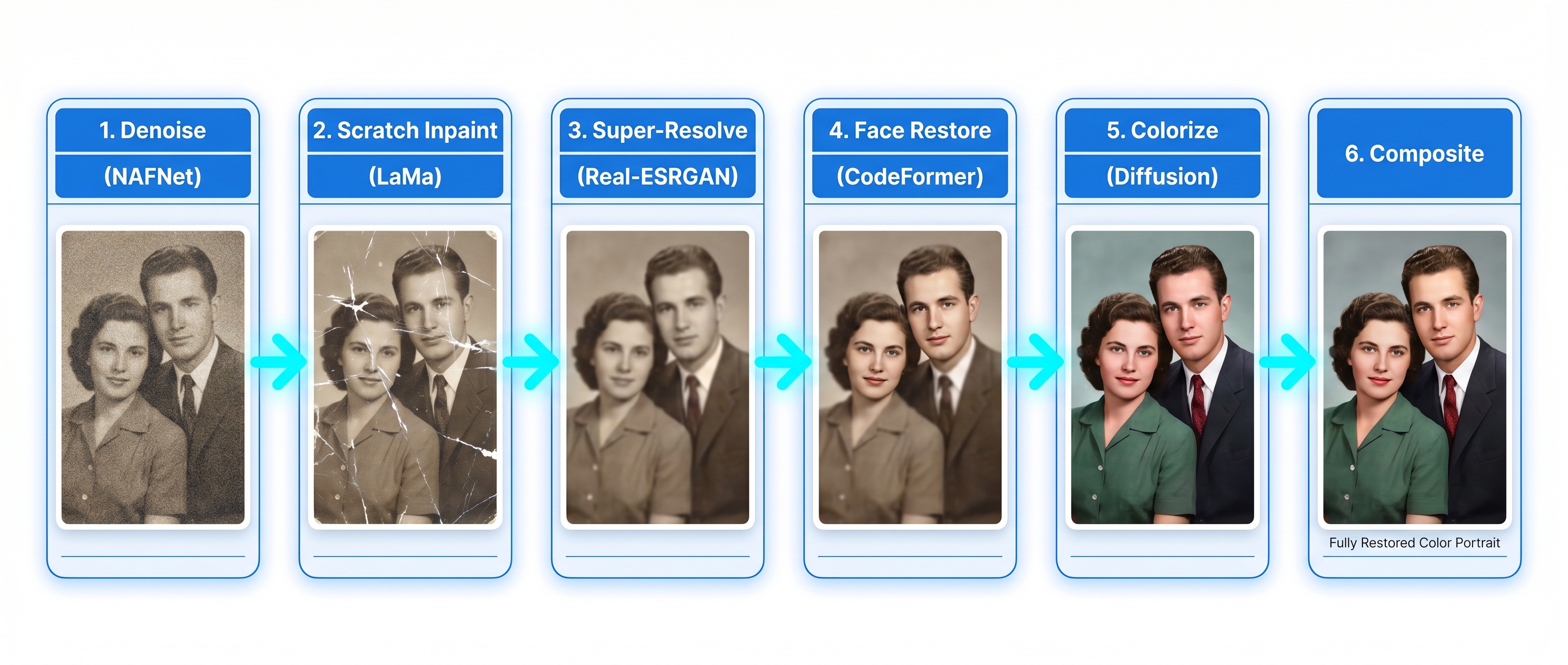
Most restoration products you've heard of, including the big mainstream apps, the heritage brands, and the GitHub-based indie tools, share roughly the same architecture under the hood. A damaged photo goes in on one side and passes through six stages before coming out the other. Each stage is a different small model doing one narrow job.
The stages, in order, usually look like this:
- Denoise. Smooth out grain, scanner noise, and film artifacts without blurring edges.
- Inpaint damage. Detect scratches, tears, and missing patches, then fill them using the surrounding context.
- Super-resolve. Upscale the image 2× or 4× and invent plausible fine detail that wasn't in the original pixels.
- Face-restore. Find each face, crop it out, run it through a dedicated face model, and blend it back in.
- Colorize. Optional. Guess plausible colors for a black-and-white image.
- Composite. Stitch everything back together so the seams don't show.
Each of those stages is typically handled by a separate open-source model, names you may recognize if you've looked under the hood of other tools: Real-ESRGAN for upscaling, CodeFormer or GFPGAN for faces, LaMa for scratch filling, DeOldify for colorization. They're capable pieces of software, and the researchers who built them did excellent work. But each was designed to solve one narrow problem, so they have to be stitched together to restore a whole photo.
The telephone-game problem
The catch with chaining six models is that every stage makes decisions based on what the previous stage handed it, not on the original photo. Small errors compound.
If the denoiser smooths too aggressively, the super-resolver has less real detail to work with and has to invent more. If the scratch-repair stage misses a crease, the upscaler faithfully upscales the crease. If the face model pulls features toward an average, the composite stage blends that average back into the photo of a specific person. By the time the image reaches the end, six different networks have touched it, and none of them could see the whole picture.
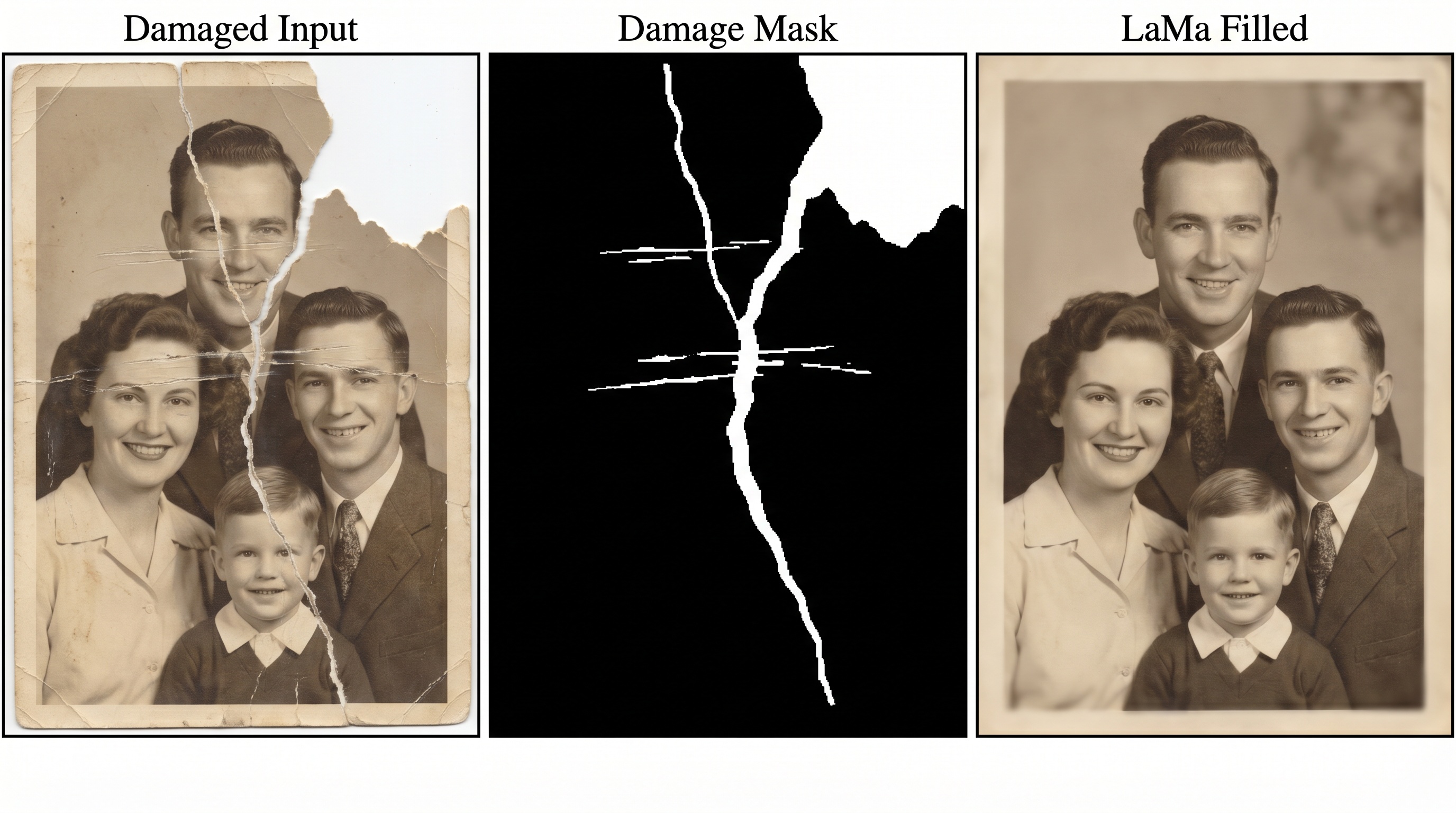
Inpainting, which fills in damaged areas using the surrounding context, is a good illustration. An older tool first has to generate a damage mask (the middle image above), then feed both the photo and the mask into an inpainting model. That model only sees the masked region. It knows nothing about the face two inches away, the lighting in the room, or what year the photo was taken. It just fills the hole.
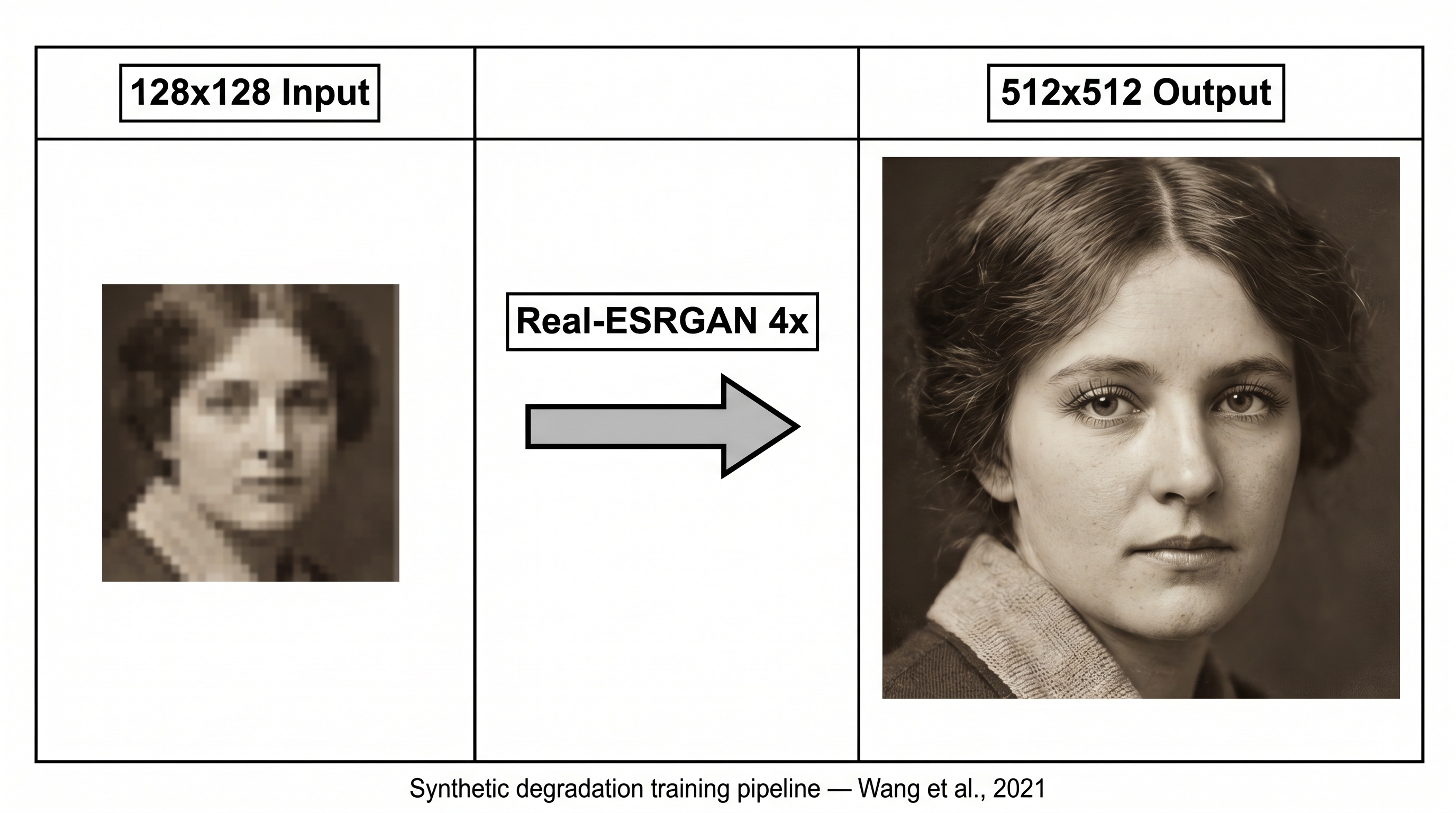
Upscaling has the same issue. The super-resolution stage does one thing well: it takes a small image and makes it larger while inventing plausible fine detail. But it invents that detail over whatever came in, including leftover scratches, denoising artifacts, and mis-repaired edges from earlier stages. If the stages in front of it did imperfect work, the upscaler amplifies the imperfection.
The face-restoration sub-pipeline
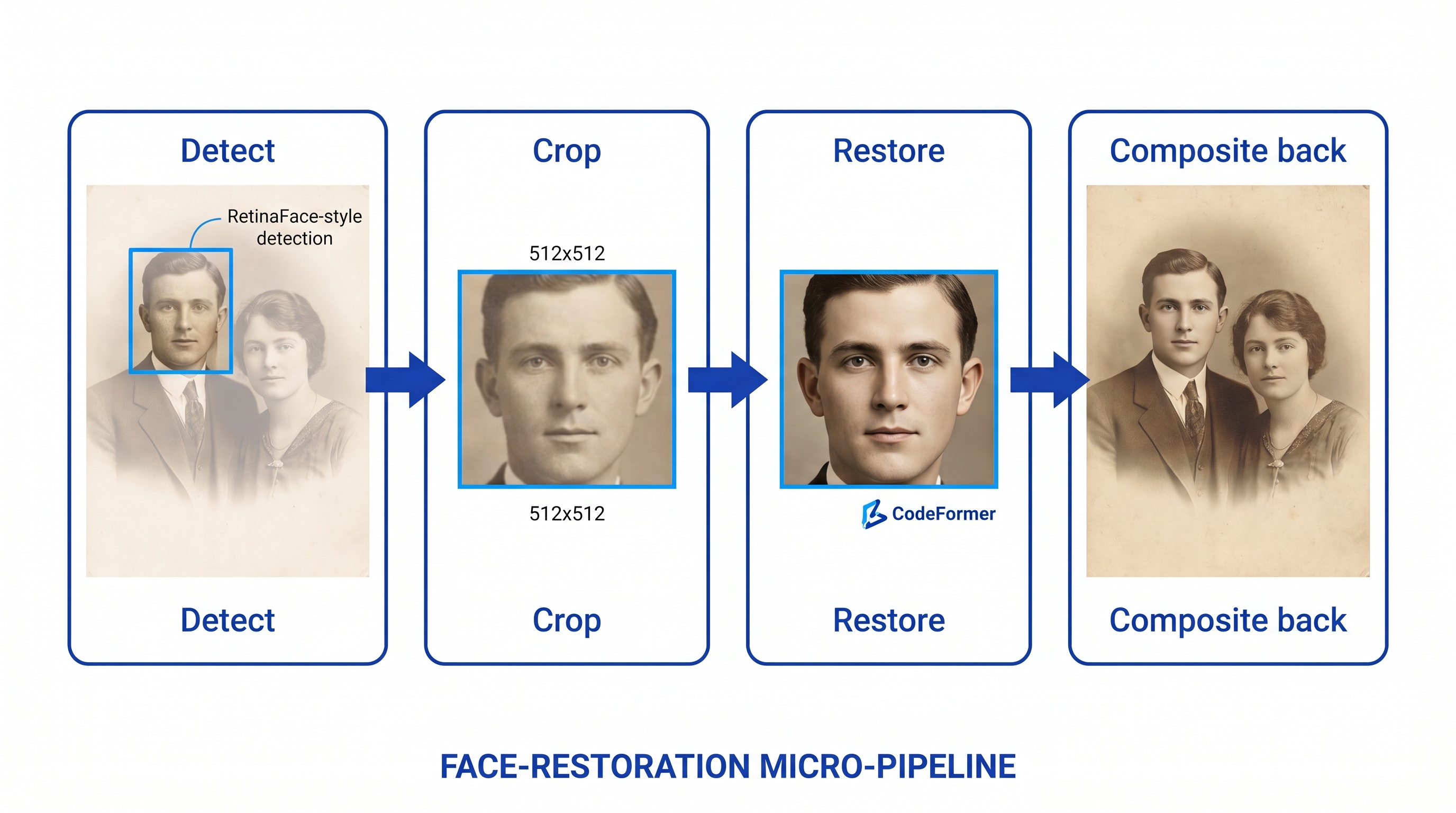
Faces get their own mini-pipeline inside the bigger one, because human eyes are brutally sensitive to face quality. In older tools, every face is detected, cropped out to a fixed size, sent through a face-specific model, then blended back into the main image.
This is where a lot of the "looks like a different person" complaints come from. The face model has never seen the rest of the photo. It's working from a cropped square in isolation, and it's been trained on millions of other faces, so it tends to pull features toward what it's seen most often. Composite that averaged-out face back into your grandmother's photo and it technically is a restored face, just not quite hers.
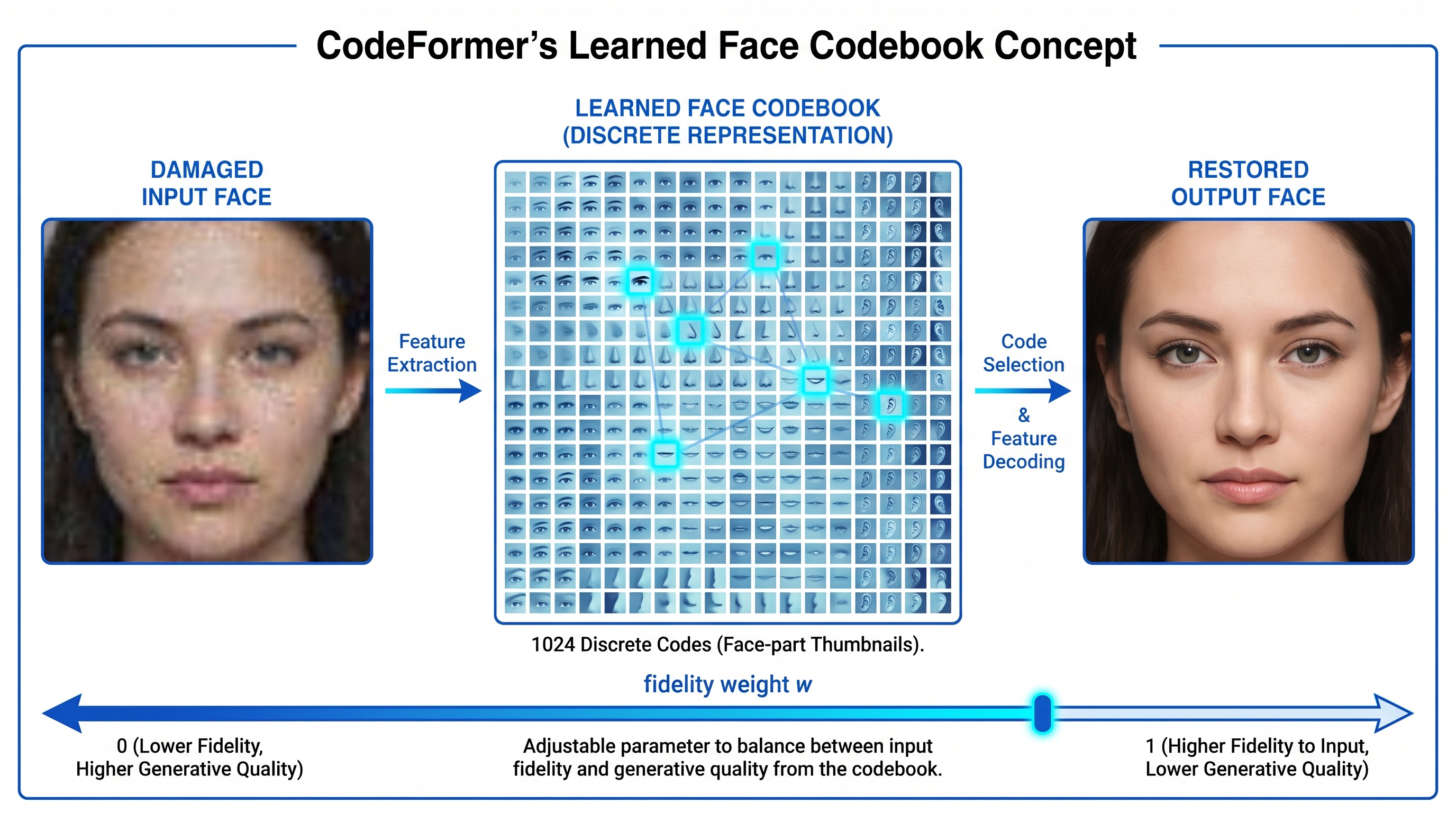
CodeFormer is a representative example of how this generation of face-restoration models works. During training it learns a library of face features, roughly a thousand eye, nose, and mouth patterns. When it sees a damaged input, it picks the closest matches from that library and reconstructs the face from them. The engineering is solid, but fundamentally it's guessing what your grandmother's eyes looked like from a menu of eyes it's seen before. A frontier model has a much larger, more flexible understanding of faces and doesn't have to fall back to a fixed menu.
Curious how the newer approach looks on your photo?
Upload any damaged or faded photo and see the difference, free.
How our approach is different
BestPhoto's restoration tool uses two frontier image models, Seedream and Nano Banana 2 running in Ultra quality mode, instead of a long chain of specialist networks. Each of these models can take a damaged photo, look at all of it at once, and return a restored version in one coherent pass.
What "frontier model" actually means
A frontier model is one of the largest and most capable image models available today. It's been trained on enormous and diverse datasets, many orders of magnitude beyond what a single-purpose restoration network learns from. That breadth is what lets it handle the whole job in one step. It already knows what damage looks like, what faces look like, what 1950s film grain looks like, what fabric should do in a wedding photo, and how to put all of that together without needing a separate specialist for each piece.
One coherent pass instead of a six-stage chain
Because a frontier model sees the whole photo at once, there are no handoffs to lose information across. Damage repair, face restoration, detail recovery, and color decisions are all made together. The model can use the lighting in the corner of the room to inform how skin tones should read. It can use the shape of a collar to guess whether an invented hair strand is plausible. A chain of narrow models can't do that kind of cross-referencing, because each one only sees its own stage.
What Ultra quality adds
Ultra quality mode runs the restoration at higher internal resolution with more processing time per photo. It takes longer to return a result, measurably more seconds, but the output preserves more real detail and invents less. For old photos with tiny faces, delicate fabrics, or complex damage, that extra processing is the difference between a restoration that looks right and one that looks close but wrong.
The broader shift from GANs to diffusion
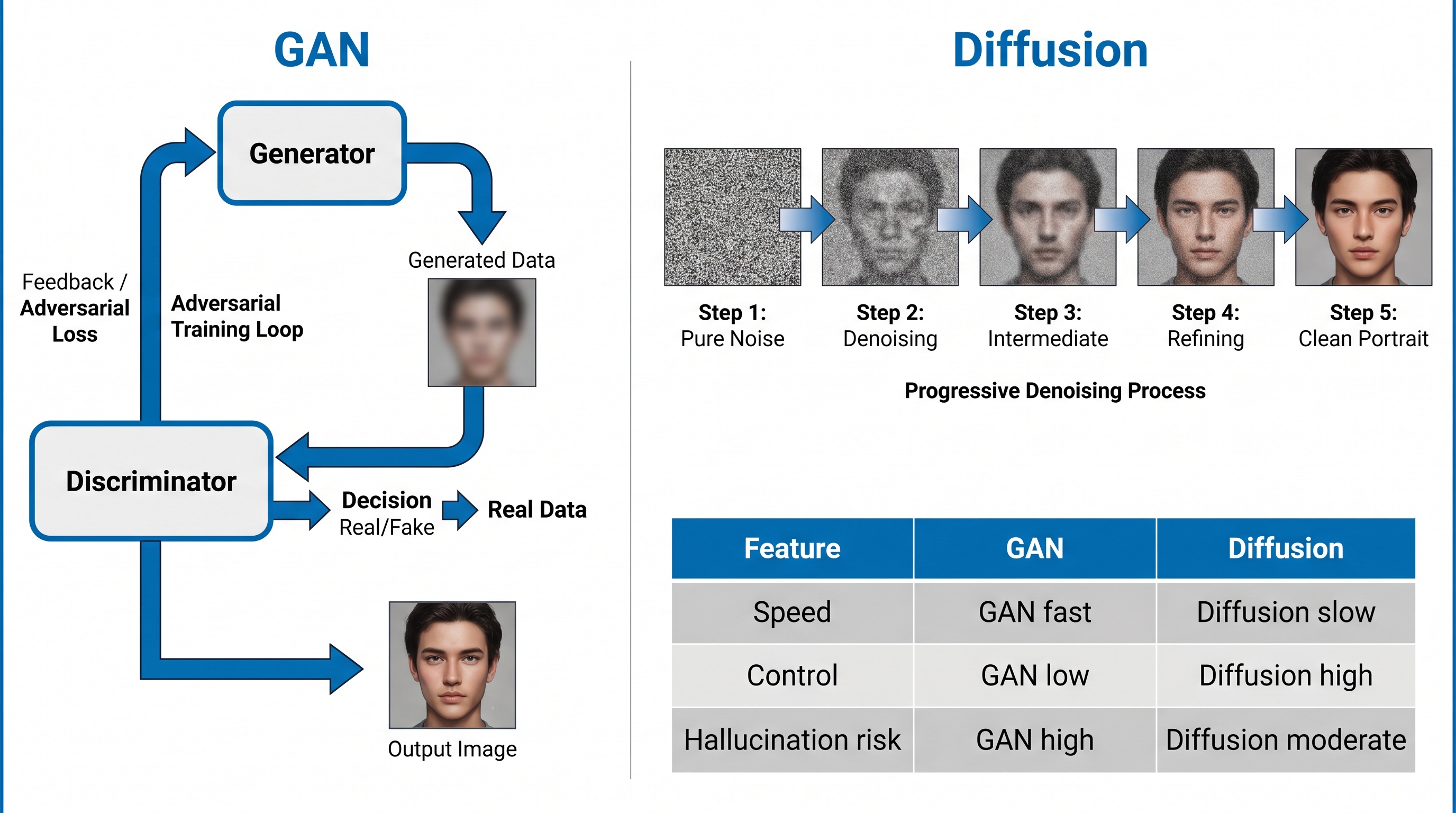
The older restoration tools are mostly built on GAN-based models, an earlier generation of image AI that's fast but tends to hallucinate confidently when uncertain. The newer frontier models are diffusion-based, which is both more controllable and better at knowing what it doesn't know. That's the underlying reason newer tools produce fewer "made-up" features in the final result.
Where the difference is most visible
Faces of relatives
A frontier model is far less likely to turn your grandmother into a generic older woman. It handles the face with the rest of the photo in view, so her features stay hers.
Severe damage
Torn corners, water stains, and missing chunks need the whole-image context to repair convincingly. A cropped patch-filling model tends to leave visible seams.
Colorization
Frontier models draw on much broader world knowledge when guessing colors. Uniform colors, skin tones, and clothing come out right more often than with the older colorizers.
Skin and texture
The plastic-skin look in older restorations comes from over-aggressive denoising. A frontier model keeps pore detail and fine texture in one coherent pass.
Practical takeaways
- • If you've tried other tools and the face came back feeling off, that's a symptom of the older pipeline approach. Try the same photo in a frontier-model tool before giving up on restoration.
- • Ultra quality is worth the wait. A few extra seconds per photo is a small price for output that invents less and preserves more.
- • Severe damage is where the difference is biggest. For mildly faded photos, older tools can do fine. For torn, stained, or heavily damaged photos, a frontier model handles the whole-image context that patch-based pipelines struggle with.
- • If colors come out confidently wrong, that's almost always an older colorizer guessing from a narrow training distribution. A frontier model's guesses are still guesses, but they're informed by a far broader view of the world.
See the newer generation on your own photo
BestPhoto's restoration tool uses Seedream and Nano Banana 2 on Ultra quality, a single-pass frontier-model approach. Upload any faded or damaged photo and compare the result to whatever else you've tried. Free, no sign-up required.
Frequently asked questions
Why do older AI restoration tools produce inconsistent results?
Most older tools chain six or seven narrow open-source models together: one for denoising, one for scratches, one for upscaling, one for faces, and so on. Each handoff is a chance for small errors to compound, which is why skin often looks plastic, faces look like strangers, or colors come out wrong.
What is a frontier image model?
A frontier model is one of the largest, most capable AI models available, trained on enormous and diverse datasets. For image work, frontier models can understand an entire photo at once, including the damage, the faces, the lighting, and the colors, and fix everything in a single coherent pass rather than relying on a chain of narrow specialists.
What does Ultra quality mode do?
Ultra quality mode runs the restoration with more processing time and higher internal resolution per photo. It takes longer, but the results preserve more real detail and introduce fewer invented features. That matters most for faces, fine textures, and severely damaged prints.
Which AI models does BestPhoto's restoration tool use?
BestPhoto uses Seedream and Nano Banana 2 in Ultra quality mode. These are modern frontier image models that handle damage repair, face restoration, and colorization in a single pass, instead of chaining together older specialist models like CodeFormer, GFPGAN, Real-ESRGAN, and LaMa the way most other tools do.
Why does the order of restoration steps matter in older tools?
In pipeline-based tools, every stage assumes the input looks a certain way. If scratches aren't repaired before upscaling, they get upscaled along with everything else. That's one of the main reasons a single-model approach produces cleaner results: there's no order to get wrong.
Ready to Transform Your Photos?
Join thousands of users creating amazing AI-generated photos with BestPhoto