Cheapest AI Video Generators for Commercial Use, No Watermark (2026)
BestPhoto: 47 cents for a 5-second clip with sound, 30 for $14, with commercial rights and no watermark. What Kling, Pika, Runway, Luma and Veo include.
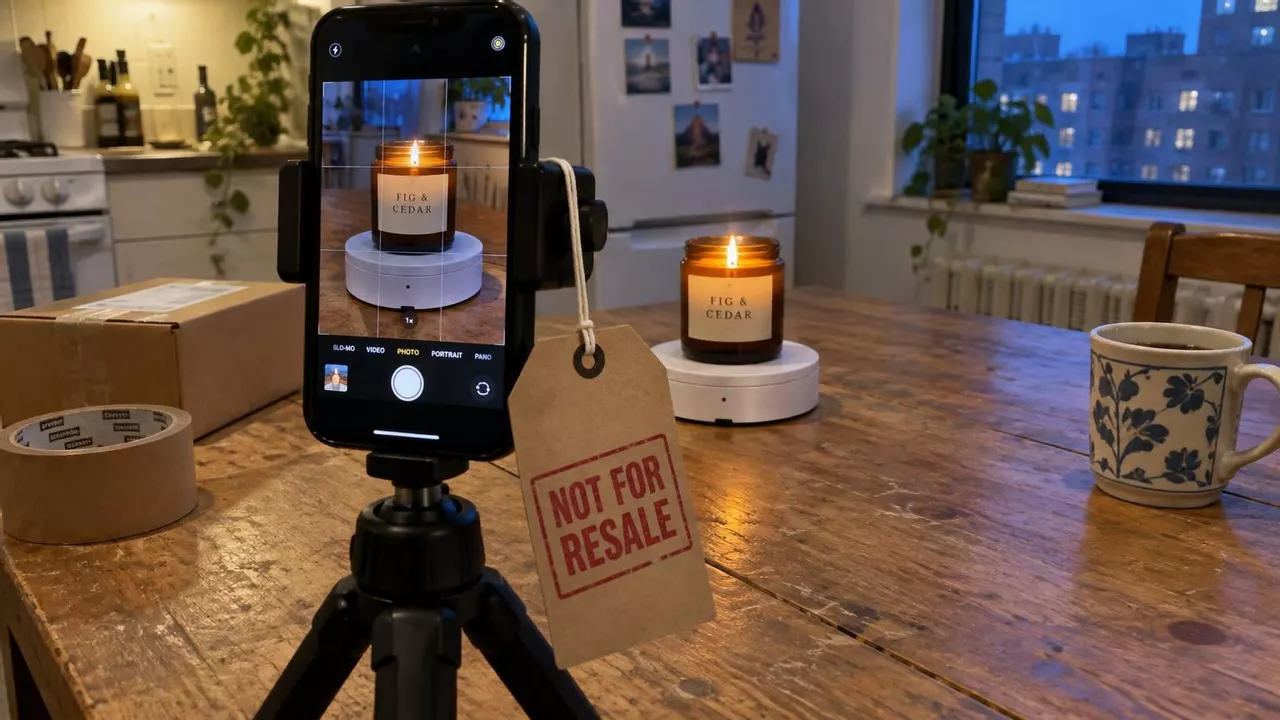
Use BestPhoto for ad clips. $14 a month buys 30 five-second clips with sound, 47 cents each. Every plan includes commercial rights and no watermark. Kling's paid plan makes 14 clips with sound, and Pika's price list doesn't mention sound.
Runway is $15 for ten clips, and Luma starts at $30. Google won't answer on Veo and tells you to read the Terms of Service “in their entirety”.
What is the cheapest AI video generator for commercial use with no watermark?
For clips with sound, BestPhoto is 47 cents per 5-second video. Every plan has commercial rights and no watermark.
Kling charges 45 credits for a 5-second clip with sound, or 14 clips on Standard. BestPhoto's 300 credits make 30.
| App | 5-second clips with sound a month | Commercial use | Watermark | Free plan |
|---|---|---|---|---|
| BestPhoto | 30 for $14, 47 cents each | Yes, on every plan | None on any plan | 20 credits (2 clips with sound) |
| Kling | 14 on Standard (VIDEO 3.0) | Standard and up, not on free | Removed from Standard | No monthly credits, watermark, not for commercial use |
| Pika | Sound not on its price list | Starter and up, not on free | None on any plan | 0 credits, no commercial license |
| Runway | 10 on Standard (Gen-4.5), sound costs extra | Yes, on any plan | Removed from Standard | Runway watermark on every video |
| Luma | None (Ray3.2 lists no audio) | Yes from Plus | None from Plus | No free plan on the price list |
| Google Veo | No plan states a license | No yes or no (“consult the Terms of Service”) | Invisible SynthID in every clip | No commercial license stated |
As of November 2026, monthly billing, US dollars. Clip counts use each app's own credit price for one clip on its first plan with commercial use and no watermark.
BestPhoto commercial rights on every plan, from $14
We charge $14 a month for 300 credits, or $92.40 a year ($7.70 a month). Every plan lets you use clips in ads, on your site, on social posts, or for client work. No plan adds a watermark.
A 5-second clip with sound is 10 credits, so $14 buys 30 clips at 47 cents each. For sharper video, 720p is 25 credits and 1080p is 50. If a clip fails, you get your credits back.
The same credits fix the photo first. One typed edit turned a kitchen-counter snapshot into the rainy window shot on the right for 2 credits, or 9 cents.


Then we made two clips at 10 credits each, one product shot and one with the owner reading our line. Tap to hear them.
One edit and two ads cost 22 credits, or $1.03 of a $14 month, leaving 278 credits.
Can you use free AI video in an ad?
On BestPhoto, yes, since free credits come with commercial rights and no watermark. On Kling and Pika, no. Free Kling clips keep the watermark and ban commercial use. Pika's free plan lists “Not included: Commercial license” and gives 0 credits.
Runway's terms don't restrict commercial use, but every free clip carries Runway's watermark, which turns your ad into an ad for Runway.
Luma lists no free plan. Google's free Flow credits are just as vague on commercial use as its paid plans.
See your product move before you pay
A free account starts with 20 credits, good for two 5-second clips with sound.
Kling commercial use and pricing
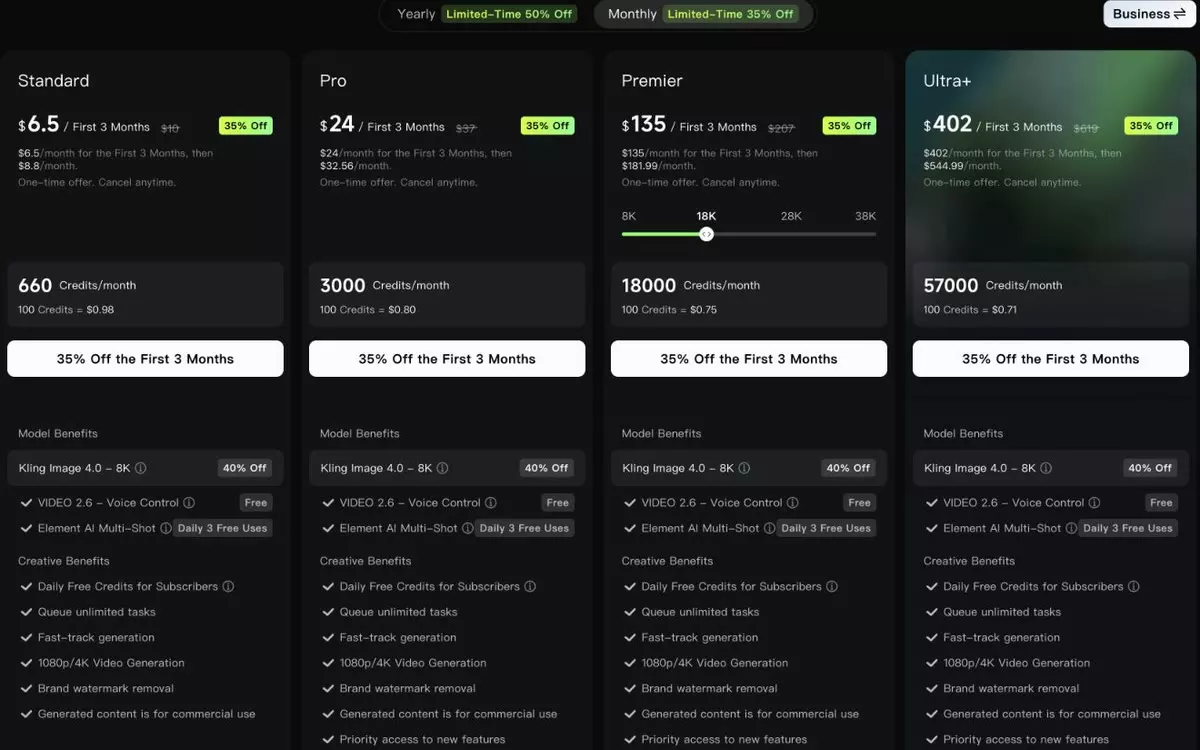
Kling Standard is $6.99 for the first month, then $8.80 a month, next to a $10 list price. You get 660 credits, “Brand watermark removal” and “Generated content is for commercial use”, none of which come free.
Kling's VIDEO 3.0 guide charges 30 credits for a silent 5-second clip at 720p and 45 with sound. That makes 14 clips with sound a month.
Kling scores 1.2 across 448 Trustpilot reviews. One user wrote about trying to cancel.
“Decided to cancel my subscription after 1d and after one month i was charged again even though i have already cancelled.”
Pika commercial license and pricing
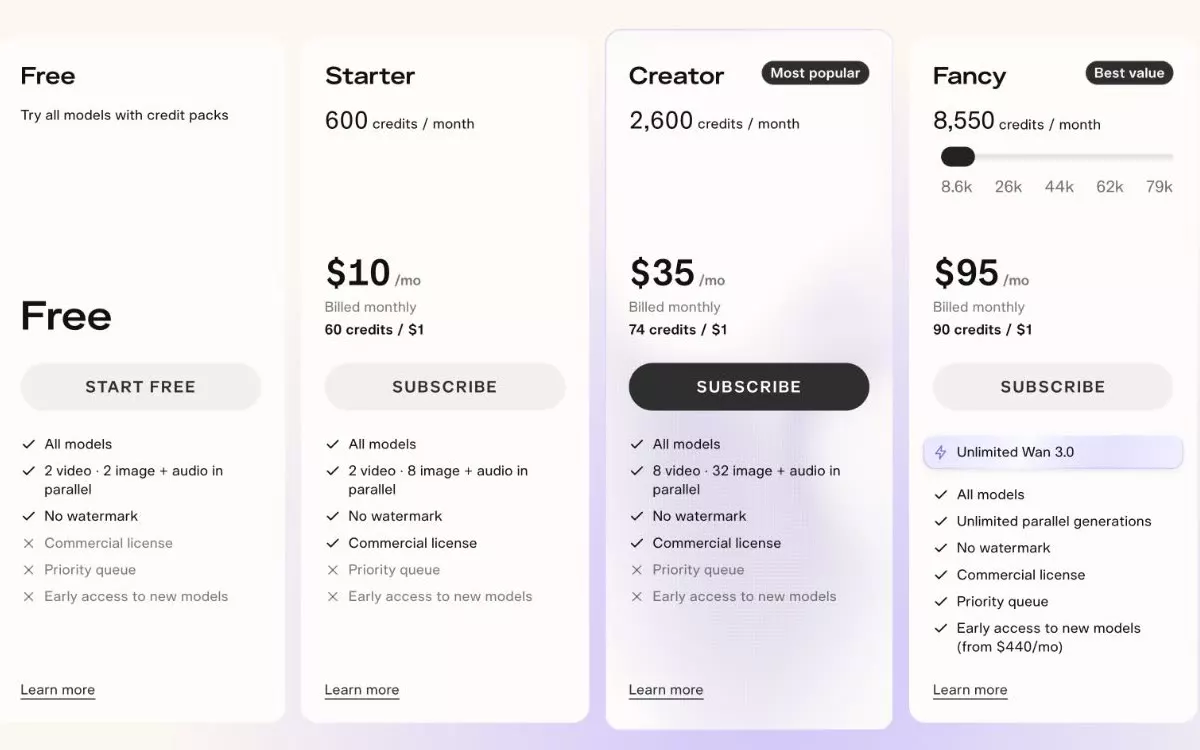
Pika Starter is $10 a month, or $8 a month paid yearly, for 600 credits. The price page lists “Included: Commercial license” and “No watermark”. It never says whether a Pika 2.5 clip has sound, and unused credits don't roll over.
Pika averages 2.3 across 81 Trustpilot reviews, including this one in all caps.
“PIKA.ART TOOK ALL OF MY POINTS. SAYING THEY DID NOT ROLL OVER.”
Runway commercial use and watermark
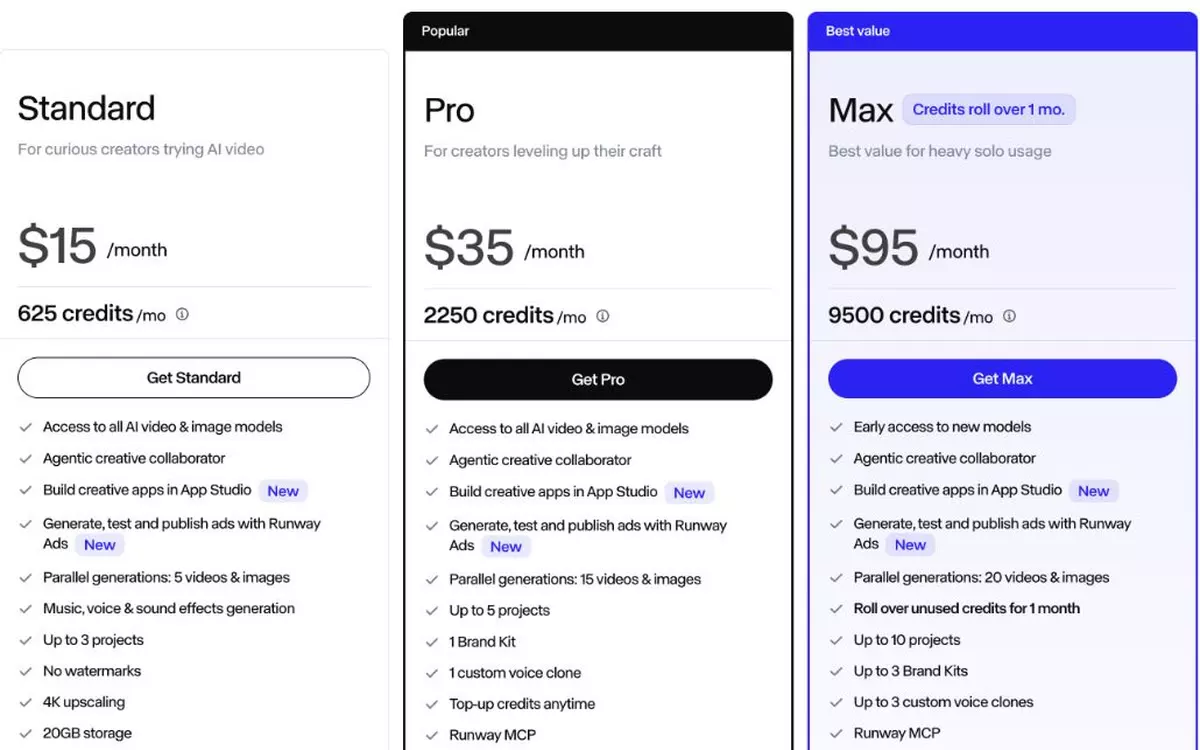
Runway's terms say it “does not restrict your commercial use of your Outputs” on any plan. Paying removes the watermark. Standard is $15 a month, or $12 billed yearly, for 625 credits and “No watermarks”.
Gen-4.5 costs 12 credits a second, so 625 credits buys 52 seconds, or ten 5-second clips. Music, voices and sound effects cost extra credits.
Runway holds a 1.1 score across 399 Trustpilot reviews, with this complaint on the $15 plan.
“Cancelling a $15 plan should take one click. Runway makes it a fight.”
Luma commercial use from $30 a month
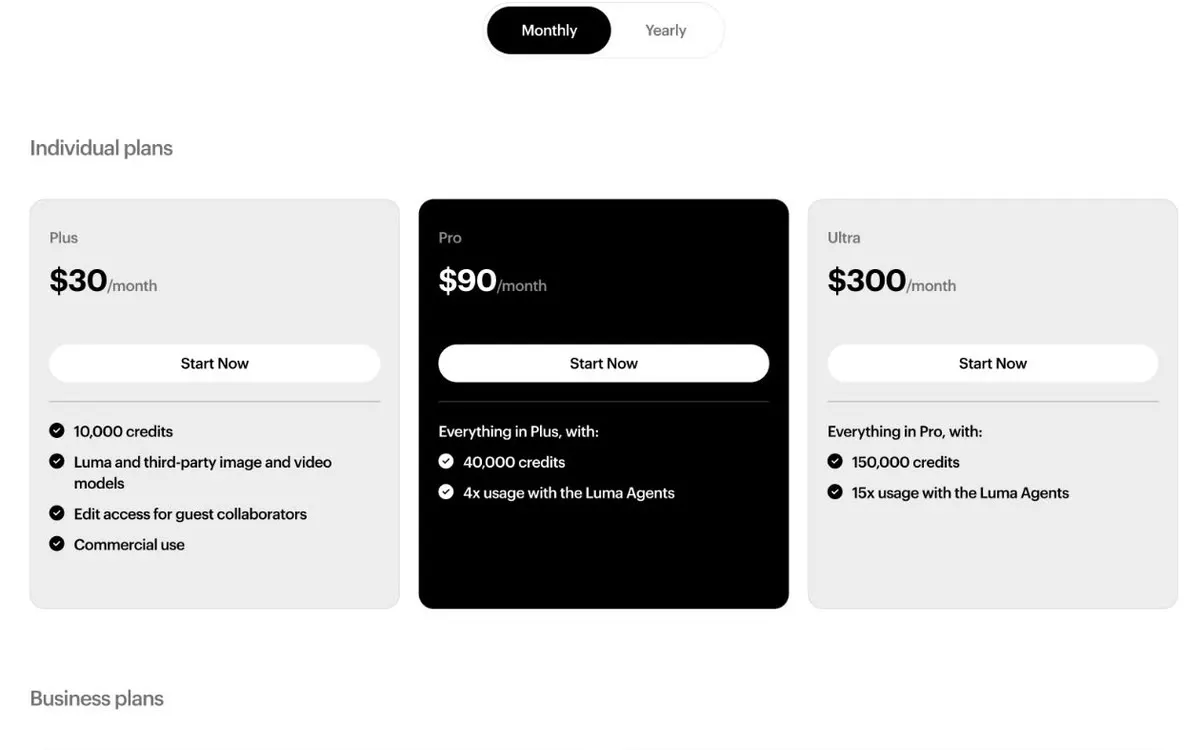
Luma's starting plan is Plus at $30 a month, or $25 paid yearly, with nothing below it. Plus lists “Commercial use” and 10,000 credits, though Ray3.2 lists no audio, so every clip is silent.
Luma sits at 1.4 across 72 Trustpilot reviews, where one user did the math.
“they give you 10,000 credits for $30, but fixing a poorly generated video costs over 5,000 credits.”
Veo and Google AI plans, watermarks, and commercial use

Google AI Plus is $4.99 a month with 200 Flow credits. AI Pro is $19.99 with 1,000. Neither plan says you can put the clips in an ad.
A profile switch hides the visible watermark, though every clip carries an invisible SynthID watermark. Google gives no yes or no on commercial use. Its Flow help page says the Terms of Service “must be consulted and followed in their entirety”.
One thread on Google's developer forum summed up the blocks.
“Flow generation blocked on Google AI Pro account, ~800 credits expired unused”
Which should you pick for client work?
Go with BestPhoto. $14 a month gets you 30 clips with sound, commercial rights and no watermark on every plan, plus photo fixes from the same credits. Other apps make sense only when a client names the model.
Per-clip costs are in Kling vs Runway vs Pika vs Veo, and all plans are on the pricing page.
30 clips with sound for $14
Commercial rights and no watermark on every plan. Cancel the day you sign up and keep the month.
FAQ
Can I use AI-generated videos commercially?
Yes. BestPhoto includes commercial rights and no watermark on every plan, from $14 a month for 30 five-second clips with sound. Kling and Pika exclude commercial use on free plans, Luma starts at $30, and Google gives no yes or no.
Which AI video generator has no watermark?
BestPhoto puts no watermark on any plan, and every clip has commercial rights and sound. Kling and Runway watermark free videos, Pika's free plan has no commercial license, and Google Veo adds an invisible SynthID watermark to every clip.
Can I use Kling or Pika free videos in ads?
Use BestPhoto for ads instead. Every plan has commercial rights and no watermark, from $14 a month for 30 clips with sound. Kling marks free clips as not for commercial use with a watermark. Pika's free plan lists “Not included: Commercial license” and has 0 credits.
Try it on one of your own photos
Upload a picture and see the result free, with no card. Pay only when you want more.