How to Save a Facebook Photo in Full Quality
Don't screenshot it. Use the photo's own Save or Download option, then ask whoever posted it for the original file. Every copy of a copy loses detail.
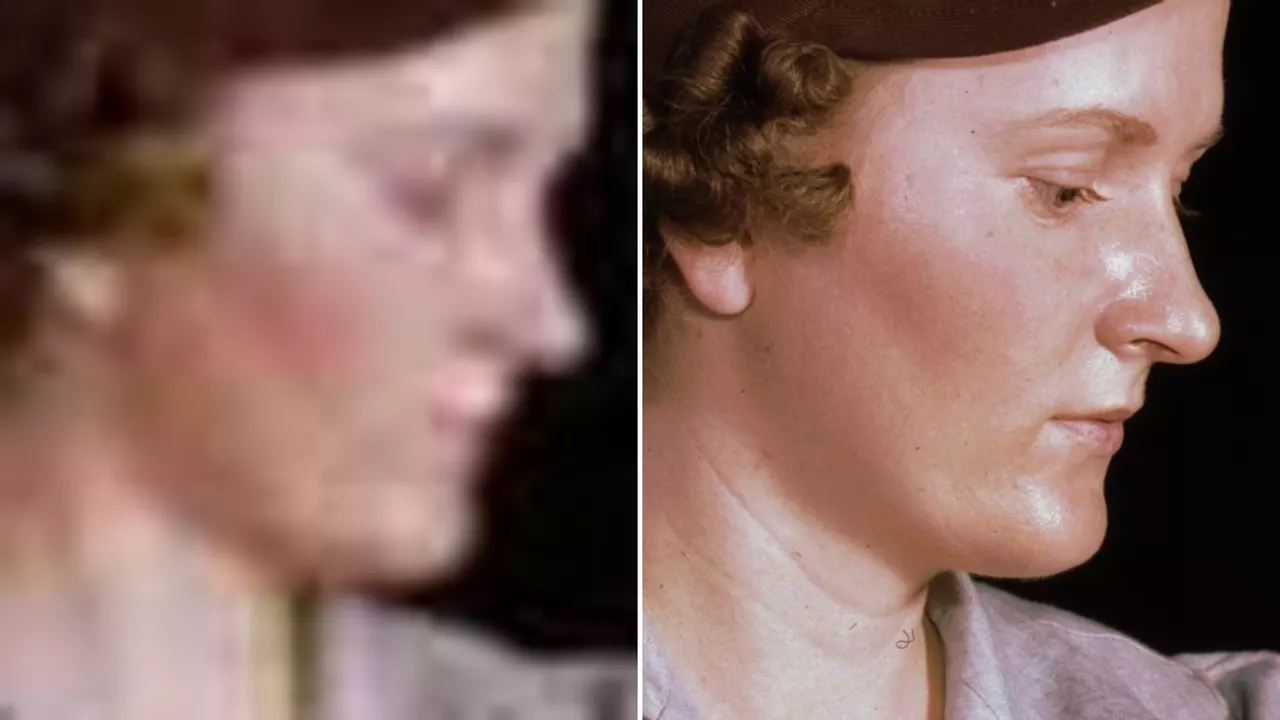
The only good photo of Uncle Ray is one his daughter posted in 2014. You screenshotted it for the slideshow, and on the big screen he looks like he's behind frosted glass.
That fuzz happened because your copy is a copy of a copy, and no app can fully undo it. The fix starts before any editing: find a better copy.
The short answer
- 1. Don't screenshot. Open the photo, tap the three dots and choose Save Photo (or Download on a computer).
- 2. Then ask for the original. Message whoever posted it and ask them to email you the file.
- 3. Fix only the best copy you can find. Ten minutes of asking around beats an hour of repairs.
Why your screenshot looks worse than the post
When someone posts a photo, Facebook shrinks big ones and re-saves every one so the feed loads quickly. It doesn't publish exact numbers, but people who've tested it for years agree that what comes back is smaller and more compressed than what went up (Louise Myers' guide is a good summary).
A screenshot copies that copy. It records only what your screen showed, often a smaller preview with the app's buttons around it, and then saves it again.
Each save throws away the finest detail first, like eyelashes and loose hairs. Family photos rarely stop at one copy, either. Watch what six ordinary copies do to one face.
Once detail is gone, nothing can put it back without guessing. An AI sharpener will happily draw new eyelashes, and on a face that small it's partly guessing at the person too. Our post on why AI restoration can change a face explains how to check for that.
How to save a Facebook photo in full quality
Use the photo's own save button. These are Facebook's own steps:
- iPhone: tap the photo so it fills the screen, tap the three dots (Options), then Save Photo.
- Android: tap the photo, tap the three dots, then Save to phone.
- Computer: click the photo, click the three dots, then Download.
That gets you the best copy Facebook has. It still isn't the original, so treat it as your backup while you look for something better. In a group chat, same rule: save the image, don't screenshot it.
Climb the ladder: each step up holds more of the face
Think of every copy of a photo as a rung on a ladder. A screenshot sits at the bottom and the print itself sits at the top.
Go back as close to the original as you can. Every repair starts from whatever copy you hand it.
Where the better copies hide
- 1The person who posted it. A 2014 photo may still be in their Google Photos, iCloud or an old laptop. If they posted a picture of a print, the print exists somewhere.
- 2The cousin with the print. One good scan of a real print beats every digital copy going around.
- 3The funeral home or church. If they printed a program or memorial photo for the family before, they may still have the file. One phone call.
- 4Old photo-lab CDs. Drugstore film developing in the 2000s often came with a photo CD. Check the envelope the prints came in.
A message you can send
“Hi Jen, I'm putting together a slideshow for your dad. Do you still have the original of the photo you posted of him in 2014, the one by the lake? Could you email it to me, or share it from Google Photos or iCloud? Texting tends to shrink it.”
That last line matters. Picture messages and many chat apps shrink photos too. Email, a shared album or a cloud link keeps the file whole.
Found the print? Scan it, or photograph it flat in soft light. Our guides to scanning old photos and taking a photo of a photo without glare walk you through both.
When the screenshot really is all there is
Sometimes nobody has the file and the print is long gone. Then the screenshot is the photo. Crop off the app's buttons, clean it up with our photo restorer, and keep the print modest: 8x10 or smaller, or a slideshow watched from across the room.
Then show the result to someone who knew him, next to the screenshot. If it doesn't look like Ray, use the plainer version. With a service coming up, our guide to choosing a photo for a funeral lays out the order that works on a deadline, and making a small photo bigger covers enlarging it.
You can try the restorer free without an account. Free results are a watermarked preview, about 1,000 pixels wide, which is fine for checking the face with family. Clean, full-size downloads come with any paid plan.
Clean up the best copy you found
Upload the photo and compare the result with the original. Try it free; clean downloads are on paid plans.
Quick questions
Does Facebook reduce photo resolution?
Yes, for big photos. Facebook shrinks large uploads and re-saves every photo to make it load fast. It doesn't publish exact numbers, but the copy you see is never the poster's original file.
Is a screenshot worse than saving the photo?
Almost always. A screenshot keeps only what your screen showed, often a smaller preview, and saves it again. Use Save Photo, Save to phone or Download.
Can I download all my own Facebook photos at once?
Yes. In Settings, open Meta Account, then Your information and permissions, then Export your information. You can pick the media quality, so choose the highest.
Export steps from Facebook's help page on exporting your information.
Image and videos: Beulah Faith, Fort Worth, Texas, October 1942, by Howard R. Hollem for the Office of War Information, Library of Congress (LC-DIG-fsac-1a34938), public domain. Cropped, then shrunk and re-saved by us on purpose to show the loss. No real Facebook post was used. The phones, ladder, screens, magnifier and paper print in the videos are a 3D mock-up.
Try it on one of your own photos
Most of our photo tools have a free version. Upload a picture and see what it does before you decide anything.