How to Colorize an Old Photo Without Getting It Wrong
A black-and-white photo stores brightness, not color, so AI colorizing is a guess. Ask the family, check skin against a real color photo, keep the original.
Your grandparents' 60th anniversary is coming, and you have the perfect surprise: their 1960 wedding photo, in color. The colorizer makes it look lovely. Then you show Grandma a sneak peek.
“My dress was ivory,” she says. “And his tie was green. He wore it to every wedding after.”
A black-and-white photo never recorded any colors, only how bright things were. So a colorizer can't find the colors. It guesses them, and your family holds the answers.
The short version
- 1. Ask first. Eyes, hair, clothes, and a color photo of the person or their family.
- 2. Check every guess, skin most of all.
- 3. Fix misses one at a time, and keep the black-and-white next to the color version.
A black-and-white photo only kept the brightness
Every spot on a black-and-white photo is a shade of gray. A red dress and a green dress of the same brightness print as the same gray, and nothing in the photo says which one it was.
So the AI goes by what's likely. Skies are usually blue and grass is usually green. But “when there is uncertainty, such as a person's shirt color, a colorization system must make a guess,” as colorization researcher Richard Zhang told Scienceline.
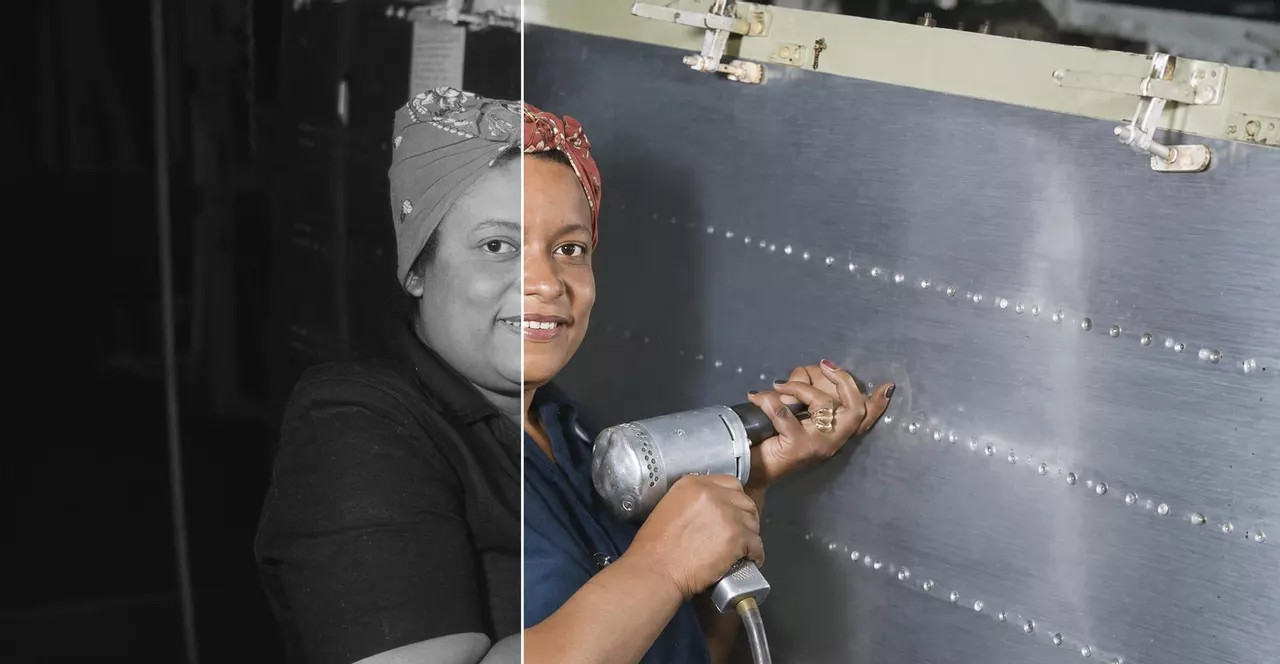
To see how good those guesses are, we took a real color photo from 1943, turned it black and white, let our restorer color it back in, and put the truth next to it.
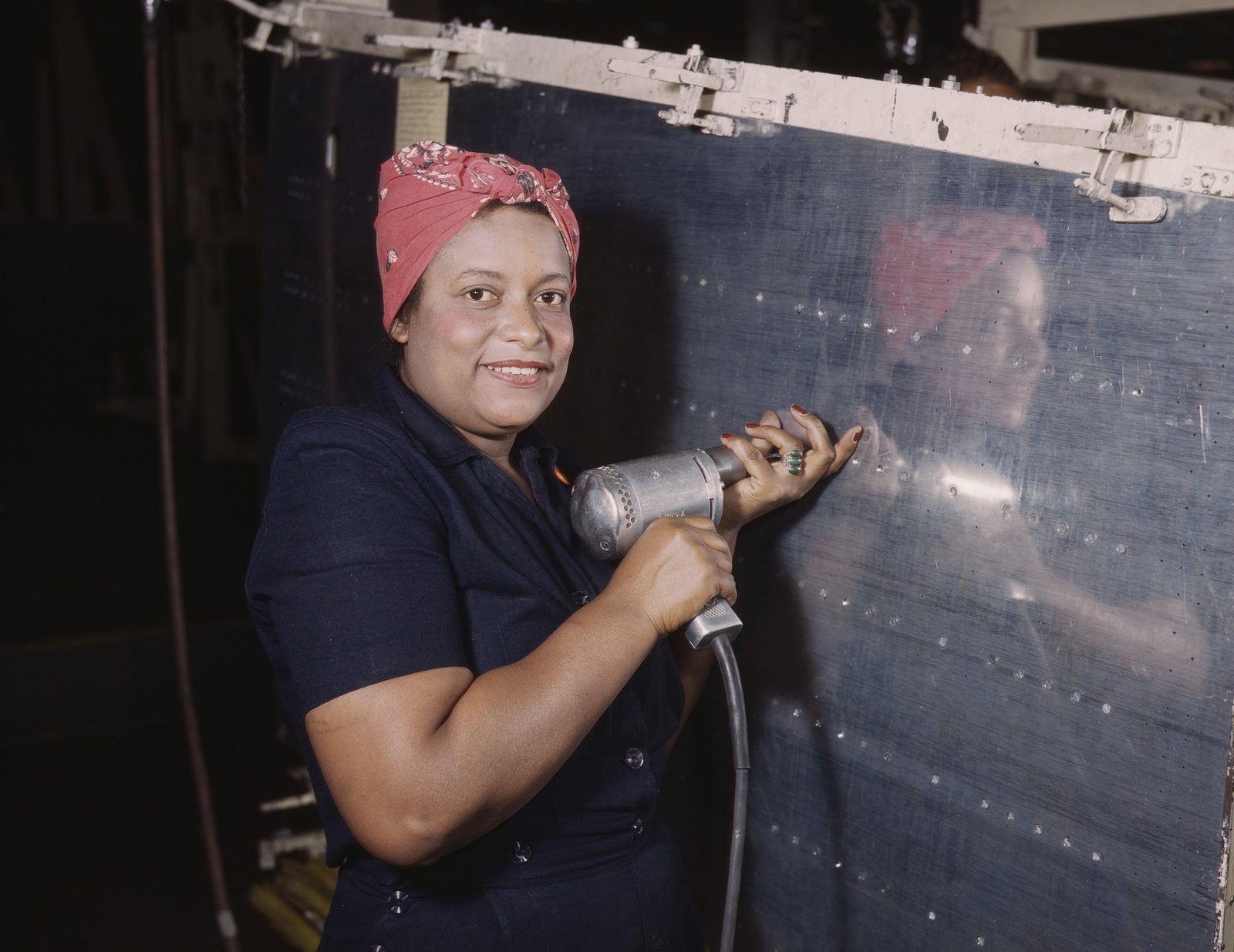
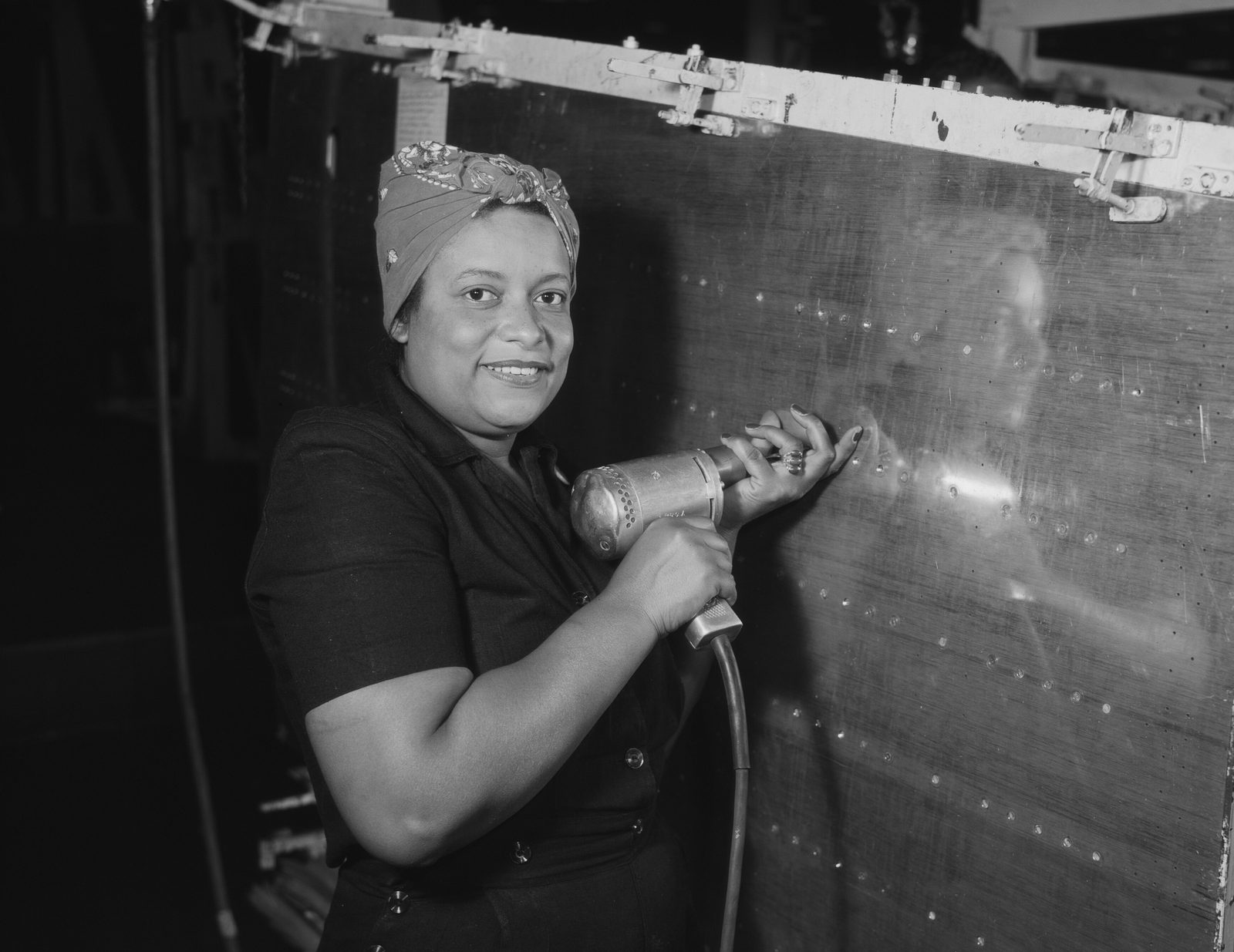
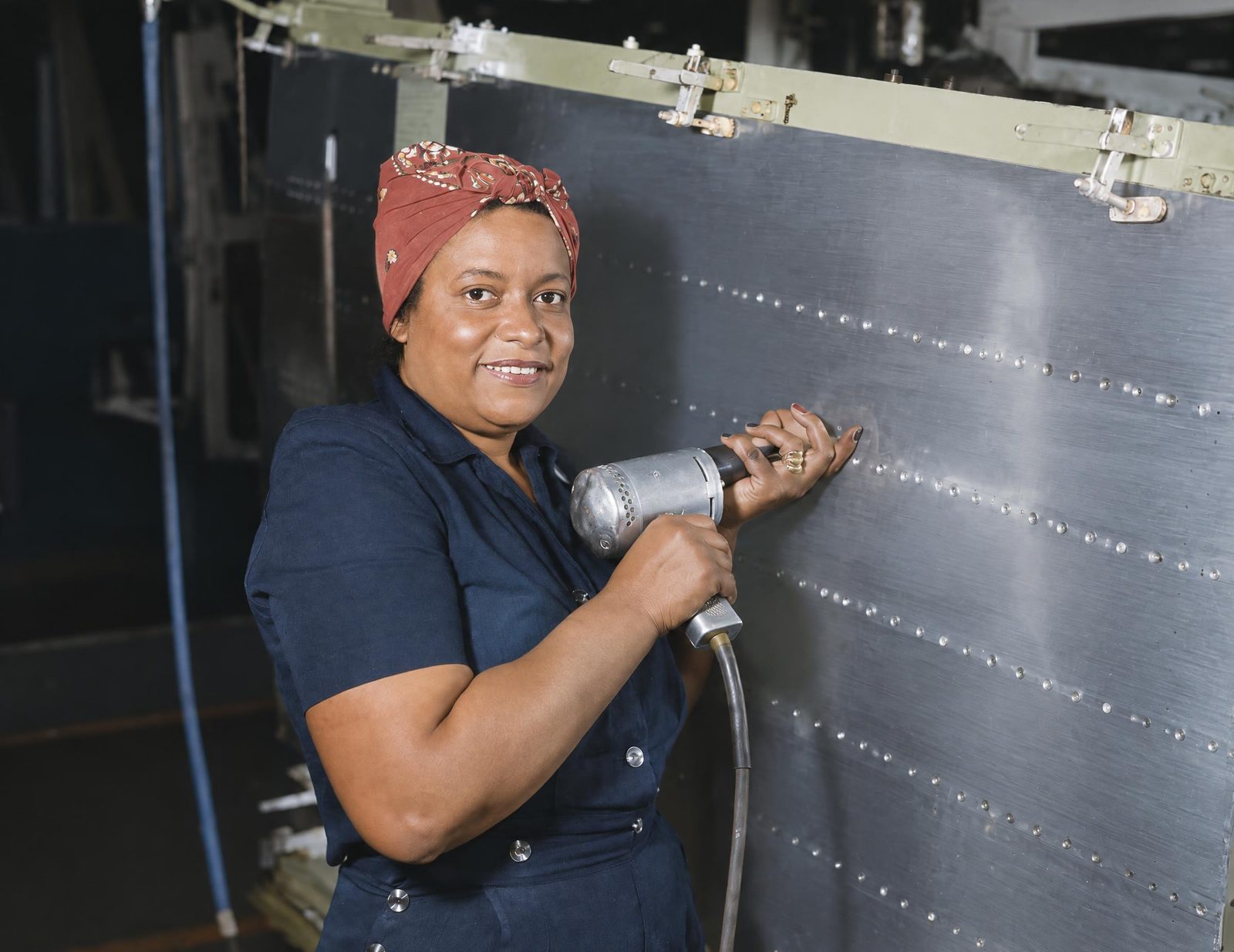
- 1Red bandana: right
- 2Her skin: close, a little warmer
- 3Ring: green stone became gold
- 4Hose: dark brown became blue
- 5Her reflection: painted out
- 6Cream frame: turned olive
Alfred T. Palmer, Vultee aircraft plant, Nashville, February 1943. Library of Congress, FSA/OWI color photographs, no known restrictions. Turned black and white by us, then colorized with our photo restorer (“Restore and add color”), first try.
It did better than you might expect. A red bandana on a wartime factory worker is the likely guess, so it got that right, and her skin came back close. Everything it couldn't know, it made up: her green ring turned gold and a brown hose turned bright blue.
When your family's truth happens to be the likely color, the AI looks brilliant. When Grandma's dress was ivory and Grandpa's tie was green, it has no way to know.
Skin is the guess that matters most
A wrong tie is a detail. Wrong skin changes how you remember a person. And skin is hard, because very different skin tones can turn into the same gray.
When the AI is unsure, it tends to settle on something in the middle. AI researcher Samuel Goree describes the result in Hyperallergic: colorizers end up “lightening dark skin and dulling the past.” Many people have seen it happen to their own grandparents.
Our tool can do it too. Here's a 1973 color slide of a girl laughing on Chicago's South Side, taken by photographer John H. White. We made a gray copy and let our restorer color it.
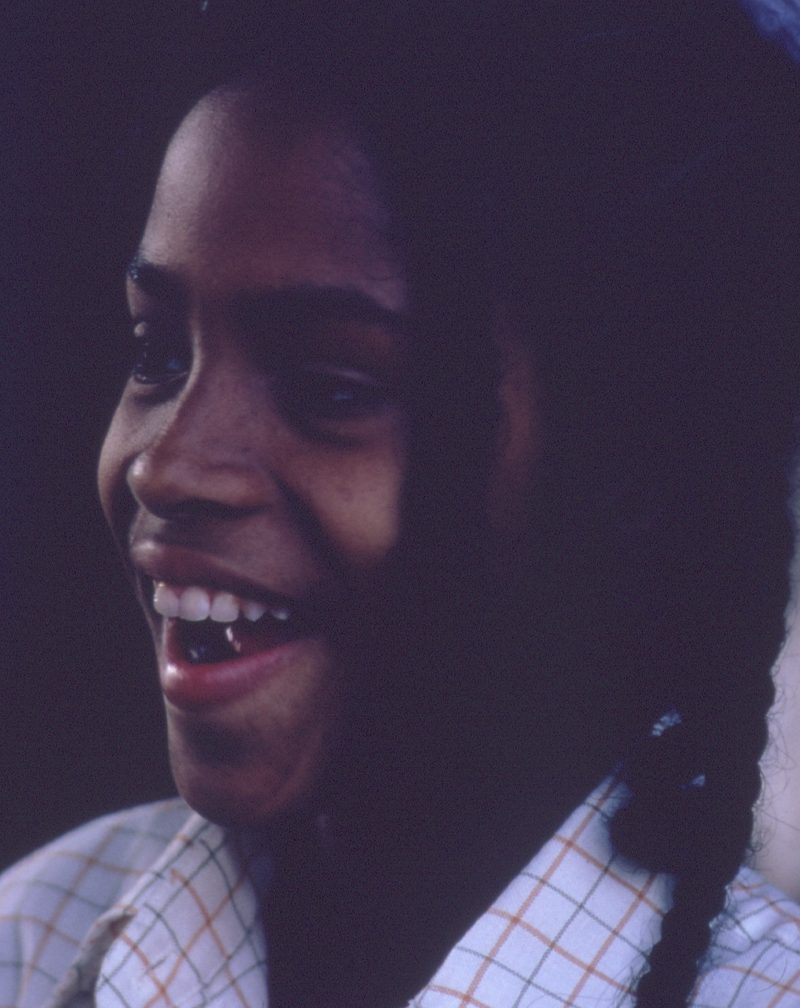
The real 1973 slide
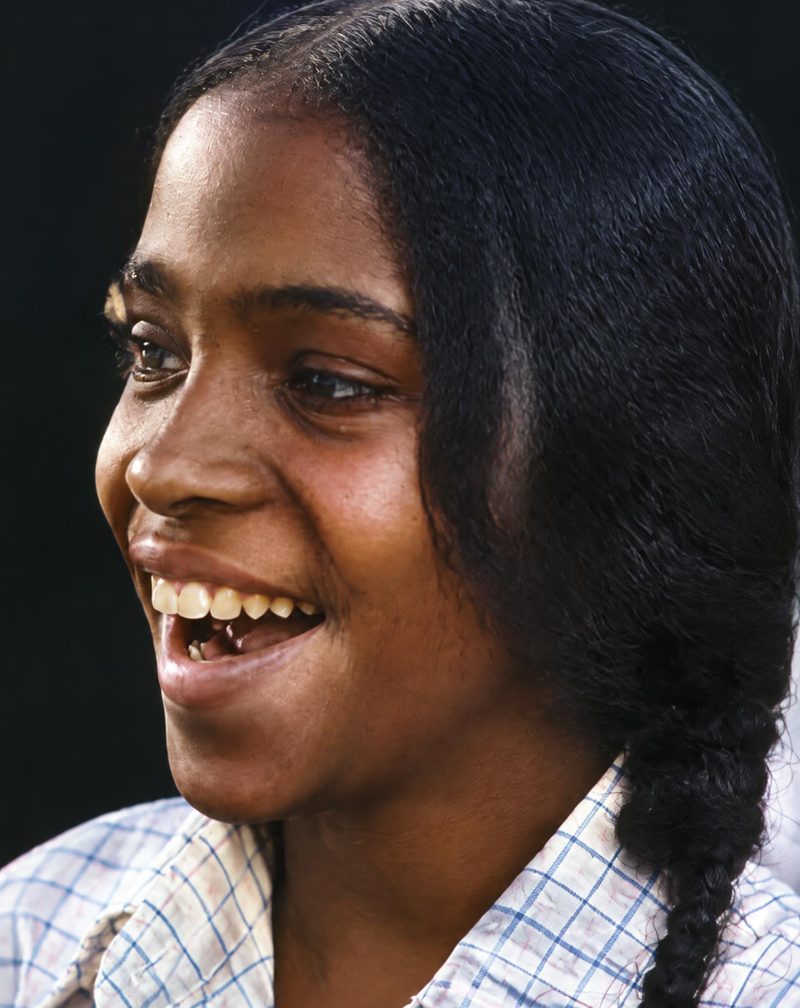
AI color, from a gray copy
- Skin: several shades lighter
- Background: darker
- Hair: restyled
- Shirt checks: orange became blue
The slide itself is dark and a little purple, so her true color is probably somewhere in between. Even so, the colorized version made her skin clearly lighter and her hair a different style. On the 1943 photo the same tool kept skin close. You can't tell from the gray which way it will go, so check every time.
One quick test: if an old photo is too dark, a good fix brightens everything together: faces, clothes and background. If skin gets paler while the background stays dark, the person was lightened, not the photo.
How to get skin right
- 1Find a color reference. A color photo of the same person is best. One of a parent, child or sibling works too, and so does the person themselves if they're still here.
- 2Put them side by side, at the same size. Compare the face with the face, not with the background. Look at the cheeks, the forehead and the backs of the hands.
- 3Ask someone who knew them. “Does this look like her?” settles more than any screen will.
- 4Adjust, then check again. Run the colorizing again, or ask the AI editor for one change, like “make her skin a deeper, warmer brown, keep her face exactly the same”. Compare again until the family says yes.
Old color prints can be off too. For decades, photo labs tuned their printers to a test card of a white woman, the “Shirley card”, and darker skin often printed badly (National Gallery of Art). Add fading on top, and treat a 1970s print as a rough guide, then ask a person.
Ask the family before you colorize
For a family photo, the research is one phone call. Tick these off as you get answers, or copy them into a text.
Ask before you colorize
0 of 6 answered
Write the answers down. They're family history too.
Then look at your result and find every color you didn't get from a person. Eyes and hair are the usual misses. If damage covered a face, the AI also had to rebuild the face itself, which is a bigger problem. Here's how to check a restored face.
Our colorizing tools don't take color instructions, so colorize first. Then open the result in the AI editor (it needs a free account) and ask for one change at a time, like “make her dress ivory”, plus what must stay, like “keep both faces exactly as they are”. Why naming what stays matters.
Keep the black-and-white next to it
Keep the black-and-white. It's the original; the color version is your family's best guess on top of it. Save both files, put “colorized” in the color one's name, and write “Colorized 2026, colors from Grandma” on the back of the print. For the anniversary, frame the two side by side.
For a scratched or faded black-and-white photo, choose “Restore and add color” in our photo restorer. It fixes the damage and adds color in one pass. For a clean photo, the colorizer just adds color. You can try either free without an account, up to two photos a day. Free results are watermarked previews, good for showing Grandma. Clean, full-size downloads come with a paid plan, from $14 a month.
Colorize it, then check it with the family
Upload the black-and-white photo and choose Restore and add color. Try it free; clean downloads are on paid plans.
Quick questions
Are colorized photos accurate?
Only where someone checked them. AI usually gets sky, grass and trees right. Eyes, hair, clothes and skin are guesses until a relative or a real color photo confirms them.
Why did the colorizer make my grandparent's skin lighter?
A black-and-white photo doesn't record skin color, so the AI has to guess, and when it's unsure it tends to drift toward a lighter middle tone. Compare with a color photo of the family and adjust until it matches.
Can I tell the colorizer which colors to use?
Not in our photo restorer or colorizer. Colorize first, then fix one color at a time in the AI editor with a short instruction like “make her dress ivory”.
Images: factory worker by Alfred T. Palmer, 1943, Library of Congress FSA/OWI color photographs, no known restrictions. Girl in Chicago by John H. White, 1973, DOCUMERICA, National Archives 556142, public domain. Black-and-white copies made by us; colorized with our photo restorer, first try, October 2026. The brighten-or-lighten animation uses the same slide, a copy we brightened with one exposure change, and the same AI result; the gauge heights are measured from the images. The same-gray animation is a schematic made in code, and the skin-tone animation is a schematic we made: code-made colors and a painted reference card, no real person.
Try it on one of your own photos
Most of our photo tools have a free version. Upload a picture and see what it does before you decide anything.